GetMyInvoices Alternative: Desktop App with Local Password Storage
Compare Tailride and GetMyInvoices for Mac and Windows invoice collection: local password storage, TOTP, Proton Mail Bridge, folders and pricing.

By Tailride · 8 min read · Updated October 2026
Tailride is a GetMyInvoices alternative for businesses that want scheduled invoice collection on a Mac or Windows PC, with the option to store supplier passwords locally. It collects from supplier portals, Proton Mail Bridge and invoice folders on your computer.
GetMyInvoices also has a desktop app with local browser sign-in. If you're thinking about switching, start with the invoices you need to collect: which accounts they belong to, how you sign in and where the documents need to go.
When Tailride is worth trying
Tailride is worth a look if you want to:
-
Save supplier logins in your computer's protected credential storage.
-
Use authenticator codes for automatic sign-in on supported portal forms.
-
Collect portal invoices, Proton Mail receipts and locally saved PDFs through the same app.
Make a list of the accounts you use before setting anything up. Include the country, marketplace and account type: two accounts with the same supplier name may need different connections.
Does GetMyInvoices have a desktop app?
Yes. GetMyInvoices offers a desktop app for Windows and macOS. Its desktop documentation describes an integrated local browser, manual sign-in without saving a password, optional saved logins and notifications when a connection needs attention.
Both products give you a desktop option. The details of sign-in, supported sources and accounting export deserve a closer look.
Our desktop app, browser extension and cloud fetcher comparison explains how these collection methods differ.
Tailride vs GetMyInvoices: desktop invoice collection
| What matters | Tailride | GetMyInvoices |
|---|---|---|
| Mac and Windows desktop app | Available. | Available. |
| Sign-in without saving a supplier password | Sign in interactively and keep the session. | Manual browser sign-in is supported. |
| Optional saved credentials | Protected by macOS Keychain or Windows DPAPI under your user account. | Saved logins are supported; confirm storage details for your chosen connection method. |
| Authenticator codes | Local TOTP generation; automatic entry depends on the login form. | Desktop notifications when a 2FA step requires attention. |
| Several accounts on one portal | Separate supplier profiles with isolated sessions. | Multiple accounts supported in the desktop workflow. |
| Proton Mail Bridge and local folders | Both are desktop collection sources. | Confirm these exact workflows with the provider. |
| Portal coverage | Check the supplier picker for your portal and account type. | Advertises more than 10,000 portals. |
Where a GetMyInvoices detail needs confirmation, that does not mean the feature is missing. The GetMyInvoices collection overview and Tailride's desktop overview describe the current products.
Collecting invoices with Tailride
Scheduled collection from supplier portals
If you buy through separate Amazon accounts for different offices, downloading the invoices means keeping track of each login and its order history.
In Tailride Desktop, add a supported supplier, give the account a recognisable label, choose a start date and enable automatic collection. Saving a login is optional. Each supplier profile has its own session, so you can keep separate accounts apart. The supplier profile guide covers setup.
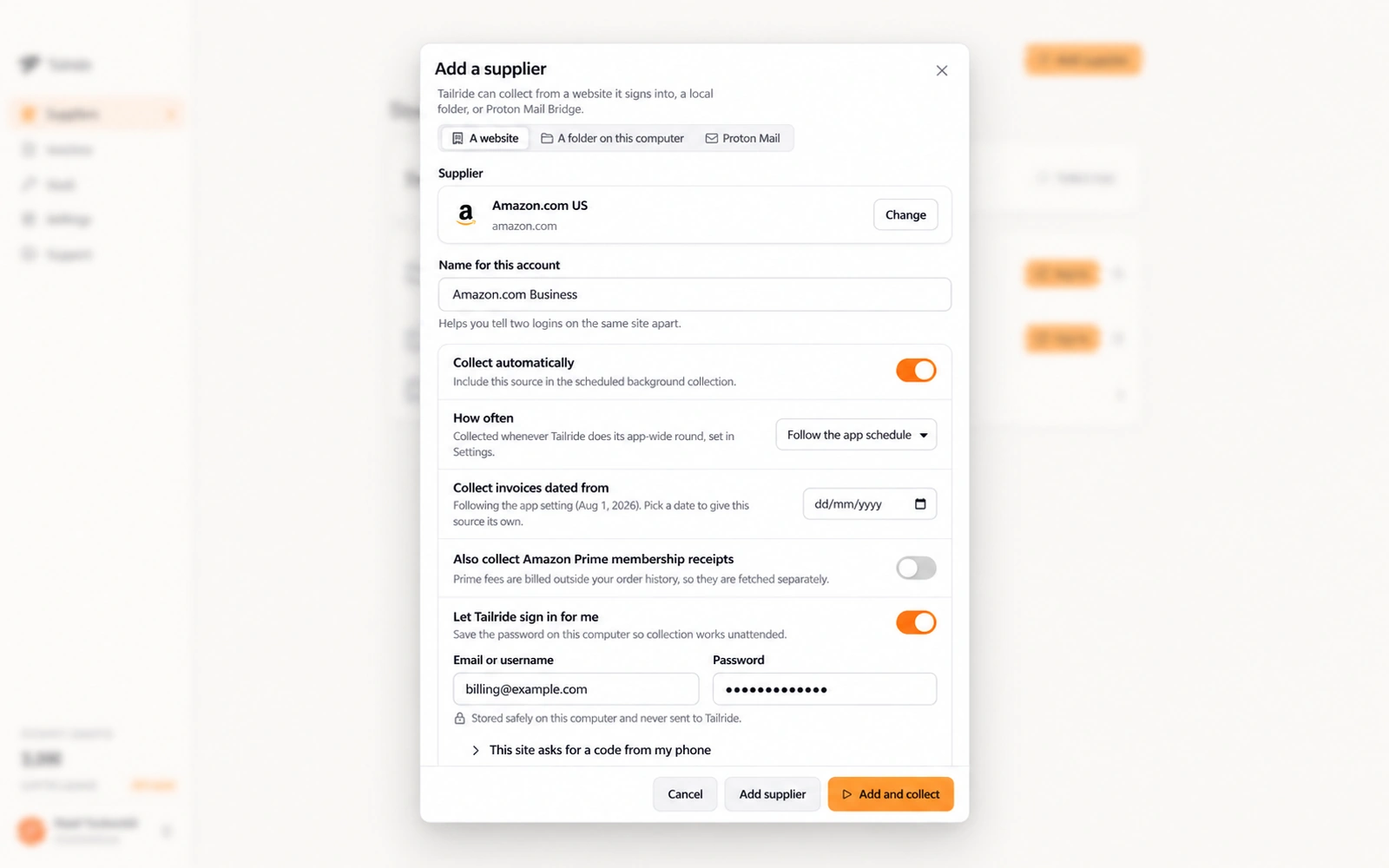
Example supplier settings in Tailride. The account details are illustrative.
Use a label that tells you whose invoices to expect, such as an office or client name. Check the first batch against that account before enabling accounting export.
Local password storage and authenticator setup
A saved supplier password stays protected on your computer, using macOS Keychain or Windows DPAPI under your user account. Tailride does not write it to a plain file or receive the password.
For portals that use an authenticator app, you can add a TOTP setup key. Tailride generates the codes locally. Automatic entry depends on the login form; some forms will still open a sign-in window for you. The passwords and 2FA documentation explains what is supported.
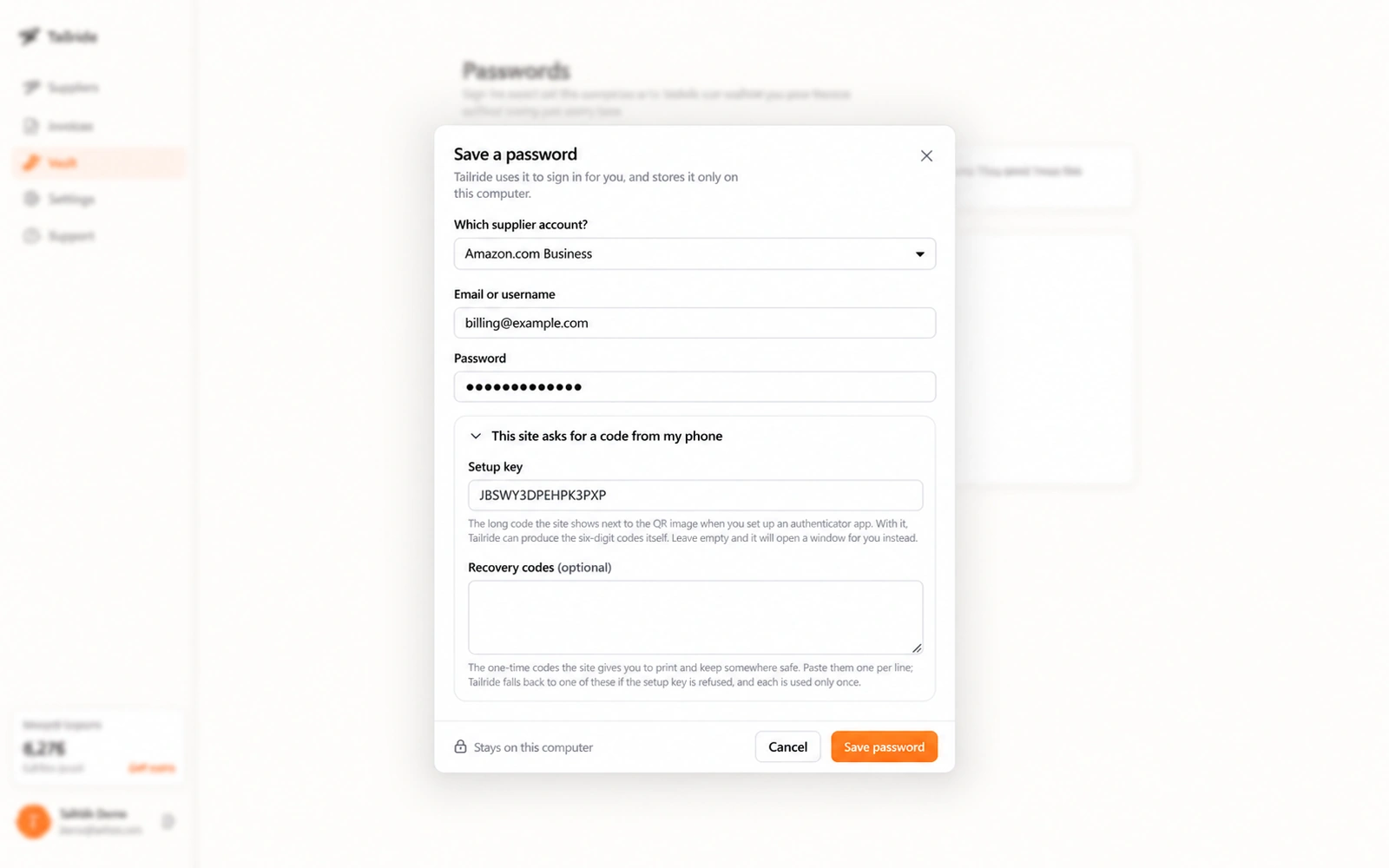
Example login and authenticator setup. The email address and setup key are illustrative. Recovery codes are optional and have been left empty.
Try a fresh sign-in during setup. An existing session can hide the extra checks a supplier asks for when you log in again.
For the steps, follow our guide to automating invoice downloads with 2FA and TOTP. Keep your usual authenticator available too, so you can sign in yourself.
Invoices delivered to Proton Mail
If suppliers email invoices to your Proton inbox, Tailride Desktop can connect through Proton Mail Bridge on the same computer. Enter the Bridge-generated mailbox credentials and choose the folders to scan.
The Bridge password is separate from your regular Proton account password. Both Bridge and Tailride need to be running when collection takes place. Our Proton Mail invoice collection guide covers the setup.
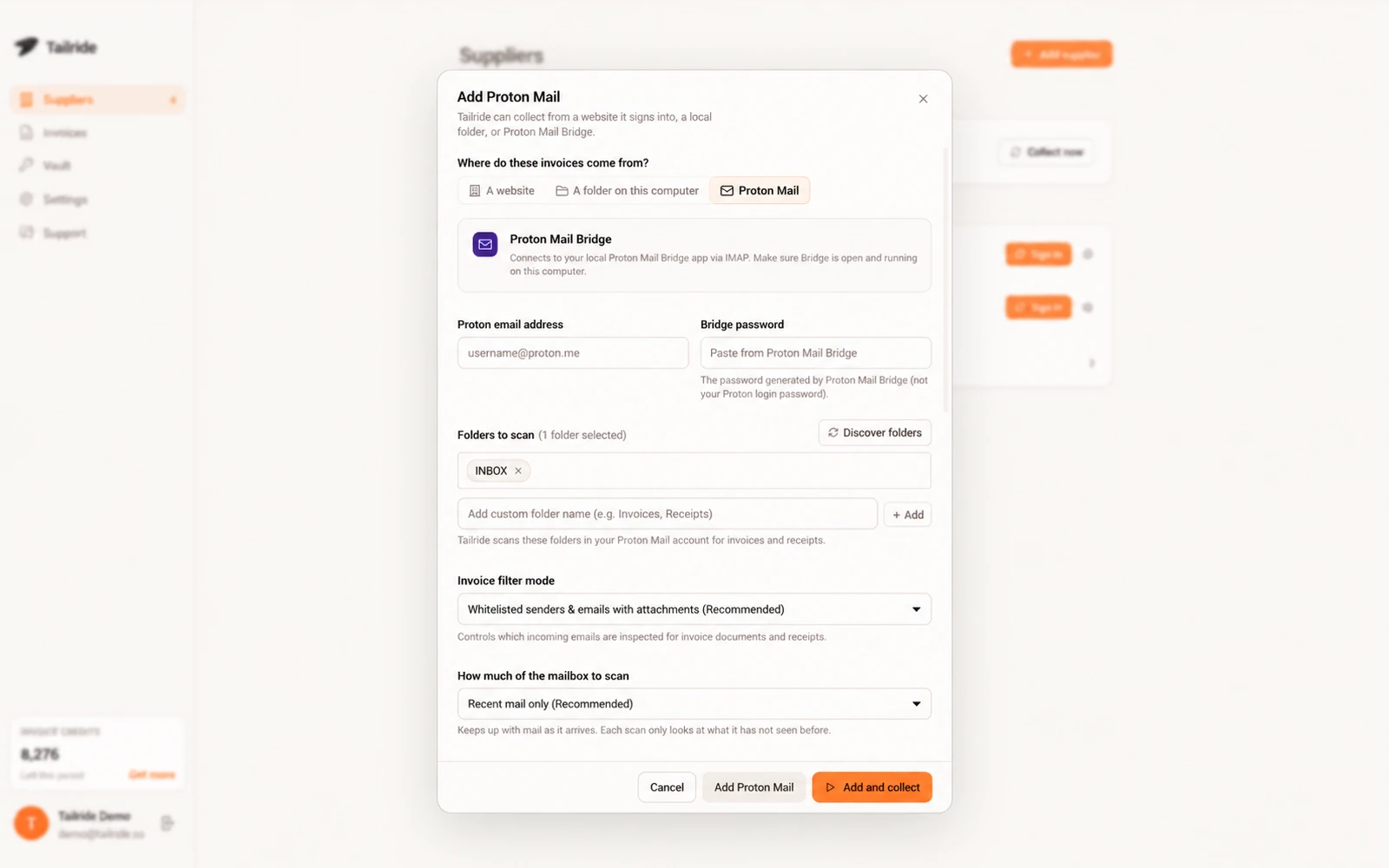
Illustrative Proton Mail Bridge configuration showing folder selection and invoice filters.
Already sorting supplier messages into an invoice folder? Use that folder in your test and compare what Tailride collects with the messages inside it.
PDFs and scans already saved in a folder
Your scanner, a colleague or a supplier website may leave you with invoice files already on disk.
With Tailride's watched folders, you choose a folder on the computer and the app sends new documents to Tailride for processing.
If you use Xero, see how to automatically import PDF invoices into Xero from a folder. Check both parts of the setup: whether Tailride collected the file and whether the processed invoice reached Xero.
What can interrupt desktop invoice collection?
Tailride must be running and your computer available. If the machine is asleep or off at the scheduled time, the app catches up when it runs again. The schedule guide explains background collection.
Sign-in can also need your help. SMS codes, CAPTCHAs and security questions can require manual input. Google blocks its sign-in inside app windows, so use the supplier's own email/password option where available. Some Microsoft tenants restrict embedded sign-in too. Check these sign-in restrictions against the accounts you plan to connect.
Local password storage is only one part of the setup. Collected invoice documents are uploaded to your Tailride account for processing, and portal invoices are saved locally by default. The supplier documentation describes where they go.
When might you keep GetMyInvoices?
If GetMyInvoices already connects to your suppliers and exports to the accounting system you use, check what you would gain from a change.
It advertises a large portal catalogue, a GoBD-compliant document archive and approval workflows. If your team uses those features, include them in the comparison alongside invoice collection. Its plans and feature list describe the available modules.
List what happens after a document is collected: who reviews it, where it is archived and how it reaches bookkeeping. Those steps can matter as much as the download.
How to test Tailride before switching
Start with one account and a batch you can check yourself:
-
Choose a supplier account. Find the exact portal, marketplace and account type in Tailride's supplier picker.
-
Collect a short period. Pick a start date that keeps the first batch manageable.
-
Compare it with the supplier portal. Check invoice references, dates, totals and any expected credit notes. Make a note of missing documents.
-
Try signing in again. Check what happens after a session expires and when the supplier asks for another security step.
-
Check the accounting export. Confirm that the original file, extracted fields and accounting treatment arrive as expected.
Keep automatic export disabled or use a test destination while comparing tools. Otherwise, you could send the same invoice to your live books twice.
Keep access to your existing archive while you check retention needs and export options. Testing a new collector does not move that archive automatically.
Comparing Tailride and GetMyInvoices pricing
Tailride has a free tier with up to 10 invoices per month that you can use indefinitely. The desktop app is included on every plan and uses the same invoice allowance and credits as other Tailride collection methods. The current plans are on Tailride's pricing page.
At the time of review, GetMyInvoices listed Essential from €19 per month, with 20 documents and five portal connections, excluding VAT. Its pricing page also lists limits for users, email accounts and sync accounts, plus optional modules.
Write down your monthly document count and the number of accounts you need to connect. Then compare the plans that cover that workload, including any extras your team uses. Check the billing period and currency before calculating a price difference.
Frequently asked questions
Does GetMyInvoices have a desktop app?
Yes. It offers Windows and macOS apps with local browser sign-in and optional saved logins.
Can I use Tailride without saving supplier passwords?
Yes. Sign in interactively and use the resulting session. The supplier may ask you to sign in again when that session expires.
Where does Tailride store saved portal passwords?
They are protected by macOS Keychain or Windows DPAPI under your user account. Saved supplier passwords are not sent to Tailride.
Can Tailride automate every two-factor authentication challenge?
No. It can generate TOTP codes and fill supported forms. SMS codes, CAPTCHAs and other security checks can still require your attention.
Does desktop invoice collection work while my computer is off?
No. Tailride catches up on missed scheduled runs when the app is running again and the computer is available.
Can I try Tailride before leaving GetMyInvoices?
Yes. Use the free allowance to collect a small batch, compare it with the supplier portal and check your export before deciding.
Start with the supplier you use most
Download Tailride Desktop and connect one supplier account. Add a Proton Mail source or local folder if that's where the rest of your invoices arrive.
After checking the first batch and its accounting export, you'll have a basis for deciding whether Tailride suits your routine.
