Peppol E-Invoicing Guide 2026: Setup, IDs & Invoice Delivery
Learn how to connect to Peppol, confirm your Peppol ID, send and receive invoices, check delivery statuses and fix errors. A guide for small businesses.

By Tailride · Sources checked 30 October 2026
To use Peppol, a small business normally connects through its accounting software, an invoicing portal or a service provider linked to a certified Access Point. The provider verifies the business, confirms its participant identifier and configures the document types it can receive. You do not need to become an OpenPeppol member simply to exchange invoices. OpenPeppol for end users, network access and membership.
This practical guide covers provider selection, Peppol IDs, sending and receiving, delivery evidence and common errors. It focuses on European invoicing workflows and Peppol BIS Billing 3.0. Other Peppol jurisdictions can use different specifications: confirm the recipient's supported profile rather than assuming one file works everywhere. For legal scope and dates, use our separate e-invoicing requirements by country guide.
What is Peppol, and how does an invoice travel?
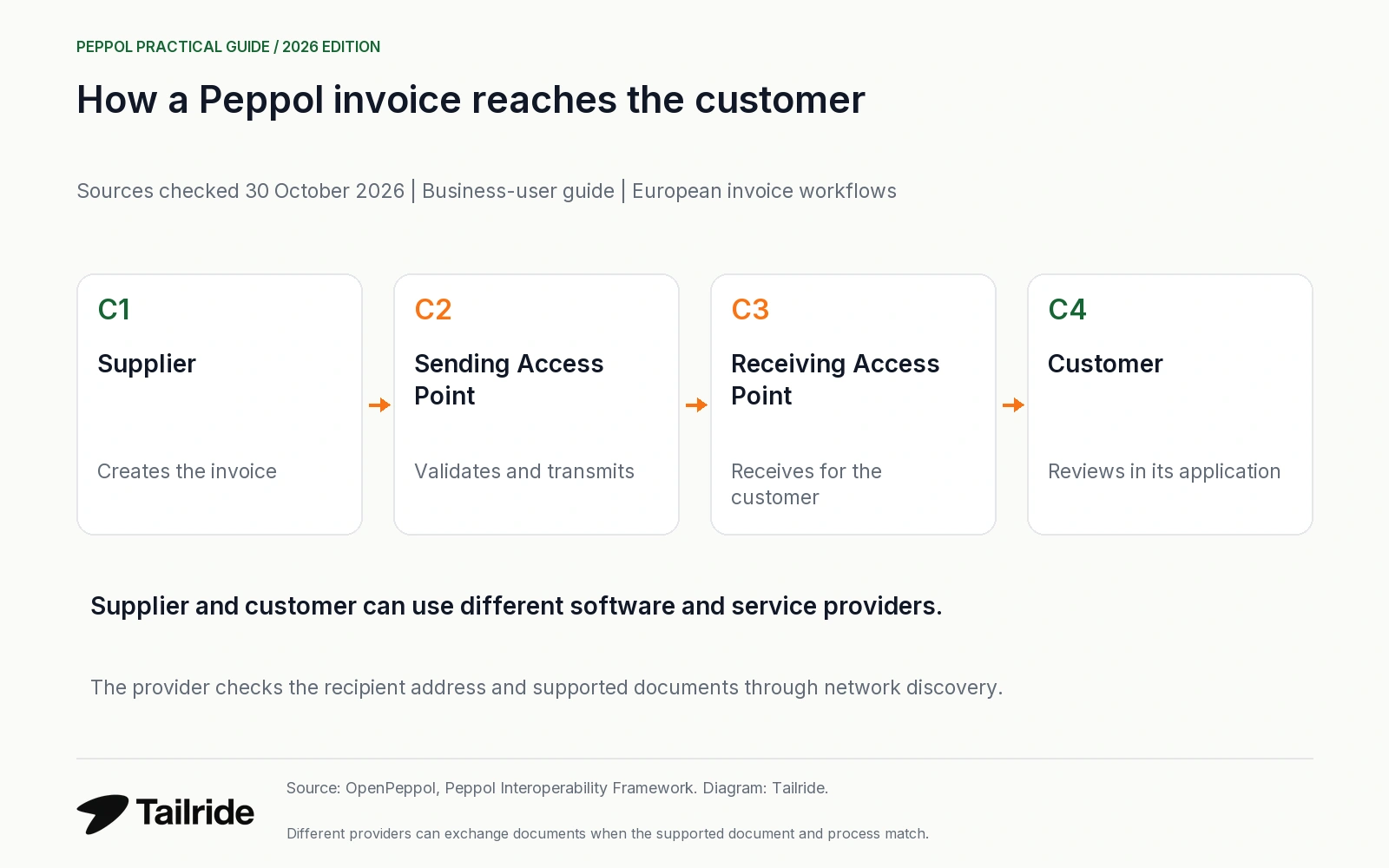
Peppol combines document specifications, network rules and certified service providers. It is not one central invoicing portal. The supplier and customer can use different software and different providers.
The usual four-corner model is:
-
Supplier: creates the invoice in its own application.
-
Sending Access Point: validates and transmits the supported structured document.
-
Receiving Access Point: receives it for the customer.
-
Customer: receives the invoice in its application or agreed workflow.
Network discovery locates the recipient's receiving service and supported document types. The service provider handles this infrastructure; the business needs correct customer data and an agreed invoice process. OpenPeppol architecture.
Step 1: choose how to connect to Peppol
Start with your existing accounting or invoicing application. Ask whether its specific plan and country configuration support Peppol sending, receiving and the required documents. A UBL import button alone is not evidence of a network connection.
| Connection option | Useful when | Confirm before committing |
|---|---|---|
| Peppol inside existing software | Your current application already supports the workflow | Sending and receiving, countries, document profiles, export and service limits |
| Web invoicing portal | You need a small number of invoices without a system integration | Whether incoming invoices, credit notes and original XML downloads are included |
| Provider integrated with your systems | You need automated exchange across business applications | Mapping, error handling, support, implementation work and ongoing charges |
These are common connection routes, not a ranking of vendors. The Dutch Peppol authority describes software, providers and portals as different ways to connect. Connection FAQ.
Check the OpenPeppol certified service-provider list and any relevant national requirements. If your software uses another company as its underlying Access Point, ask which company that is. A provider's home country in the register is not a promise that every service or jurisdiction is covered. Certified providers.
For costs, request a written quote covering setup, each legal entity, sending and receiving volumes, integration, retention, original-file export and migration. There is no single network-wide retail price for small businesses; package and provider charges vary. Authority FAQ on connection costs.
Step 2: confirm your Peppol ID and receiving registration
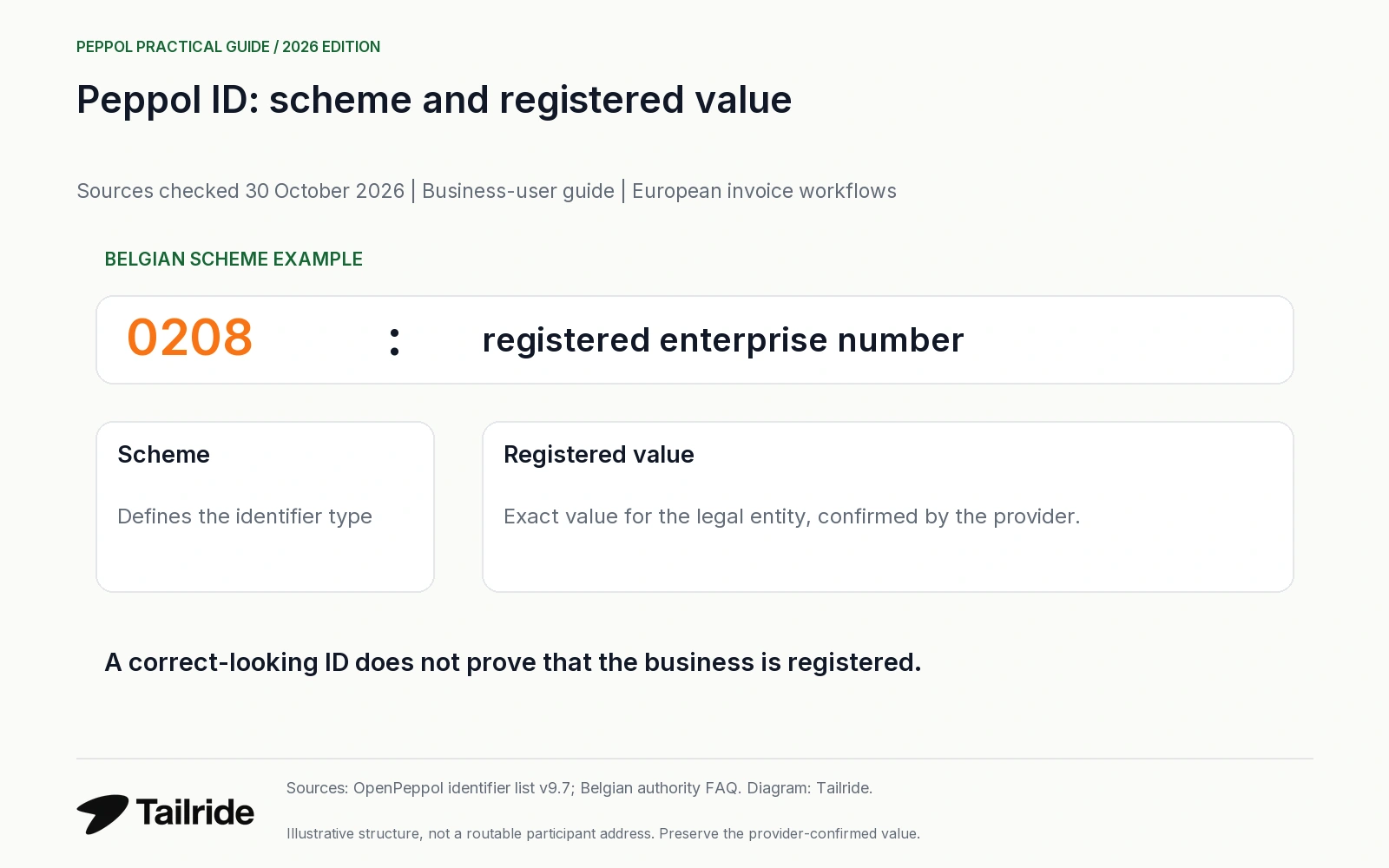
A Peppol ID, also called a participant identifier, combines an identifier scheme and a registered value. A scheme can refer to a company register, VAT identification or another recognised identifier. It is not your software password, email address or purchase-order number.
| Example scheme | What it identifies | Practical check |
|---|---|---|
| 0208 - Belgium | Enterprise number in the Belgian company register | Belgian providers must register businesses at least under this scheme |
| 0106 - Netherlands | KVK number | Use the exact registered identifier; government recipients can use OIN instead |
| 0190 - Netherlands | OIN | Confirm the receiving government organisation's supplied address |
| 9930 - Germany | German VAT identifier | Do not substitute a buyer's Leitweg-ID automatically |
| 0211 - Italy | Italian VAT identification | AgID describes the value as IT followed by the VAT number |
Sources: current identifier code list, Belgian authority FAQ, Dutch identifier requirements, AgID FAQ. These are scheme examples, not live recipient addresses or proof of registration.
Ask the provider to confirm the exact scheme, value, legal entity, production environment and receiving document capabilities. Preserve leading zeros and country prefixes where the scheme requires them. Let the provider verify the legal entity and authority to register it; do not create an extra registration simply because another application displays an unfamiliar identifier.
In a structured invoice, the electronic address and its scheme also belong in the correct document fields. A visible company VAT number elsewhere on the invoice does not replace the buyer's electronic address. Buyer EndpointID / BT-49.
Step 3: check the customer and its supported documents
Search the Peppol Directory or use your provider's recipient lookup. Match the legal entity, identifier scheme and supported invoice profile. A company may be registered to receive orders without that proving support for the invoice you intend to send.
No Directory result does not necessarily mean “not connected”. OpenPeppol says Directory publication is not mandatory, so not every registered receiver appears there. Use the OpenPeppol Lookup or ask your provider to check the network metadata for the exact participant and document type. Receiving capability also does not prove that the business can send through its chosen software. Directory coverage, authority FAQ.
Obtain the customer's order reference, buyer reference and any required department information before creating the invoice. Peppol BIS Billing rule R003 requires a buyer reference or purchase-order reference; a particular customer or national profile can impose further requirements. Do not invent a reference just to make validation pass. Reference rule.
Step 4: validate and send the first invoice
Agree a first exchange with the customer. Use a provider's test environment where available. In production, send a genuine, authorised invoice rather than a dummy tax document created only for a connectivity test.
Before sending, review the legal entities, recipient endpoint, invoice number, dates, currency, VAT treatment, line values and references. Validation checks the document structure and applicable business rules. For example, line net values must reconcile with quantity, price, charges and allowances; the fact that a PDF looks correct does not establish this. BIS Billing specification, line calculation rule R120.
Save the invoice number, network message identifier, recipient identifier, timestamp and provider result. If transmission times out, ask whether the original message was delivered before retrying. Reissuing the same charge under a new invoice number can create a duplicate commercial document rather than repair a transport problem.
Step 5: receive invoices into a controlled workflow
Enable receiving explicitly and confirm where the invoices arrive: the accounting inbox, provider portal or another agreed destination. Assign someone to monitor failed imports and documents awaiting review. A supplier sending a Peppol-format XML file by email has not thereby delivered it through the Peppol network.
Preserve the structured original, relevant attachments and delivery evidence. A PDF preview helps a person review the invoice, but should not become the only retained copy where the original structured document is needed. Ask how long the provider keeps documents, how you can export them and what separate local retention requirements apply.
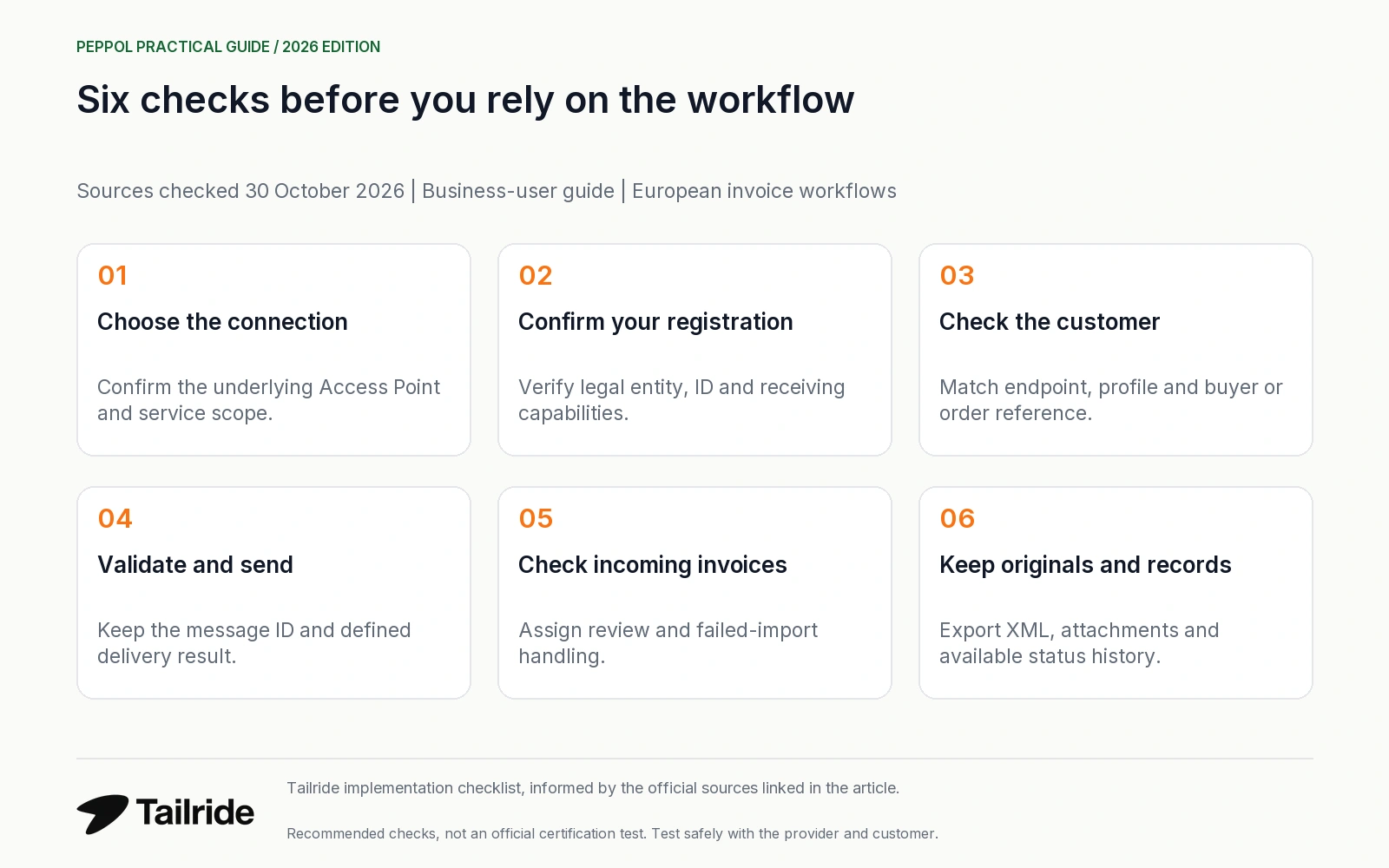
Our recommended first-exchange checks are:
| Check | Evidence to retain |
|---|---|
| Outgoing invoice reaches the agreed recipient | Invoice number, message ID and a clearly defined transport result |
| Incoming invoice reaches the responsible team | Original file and its arrival in the receiving application |
| Required references survive the handover | Buyer or order reference visible in the target system |
| Credit notes are supported | Agreed correction workflow and supported document capability |
| Duplicate handling is understood | Provider retry behaviour and your accounting duplicate check |
| Records can leave the provider | Download of originals, attachments and available status history |
This is a Tailride implementation checklist, not an official certification test or a guarantee of tax compliance.
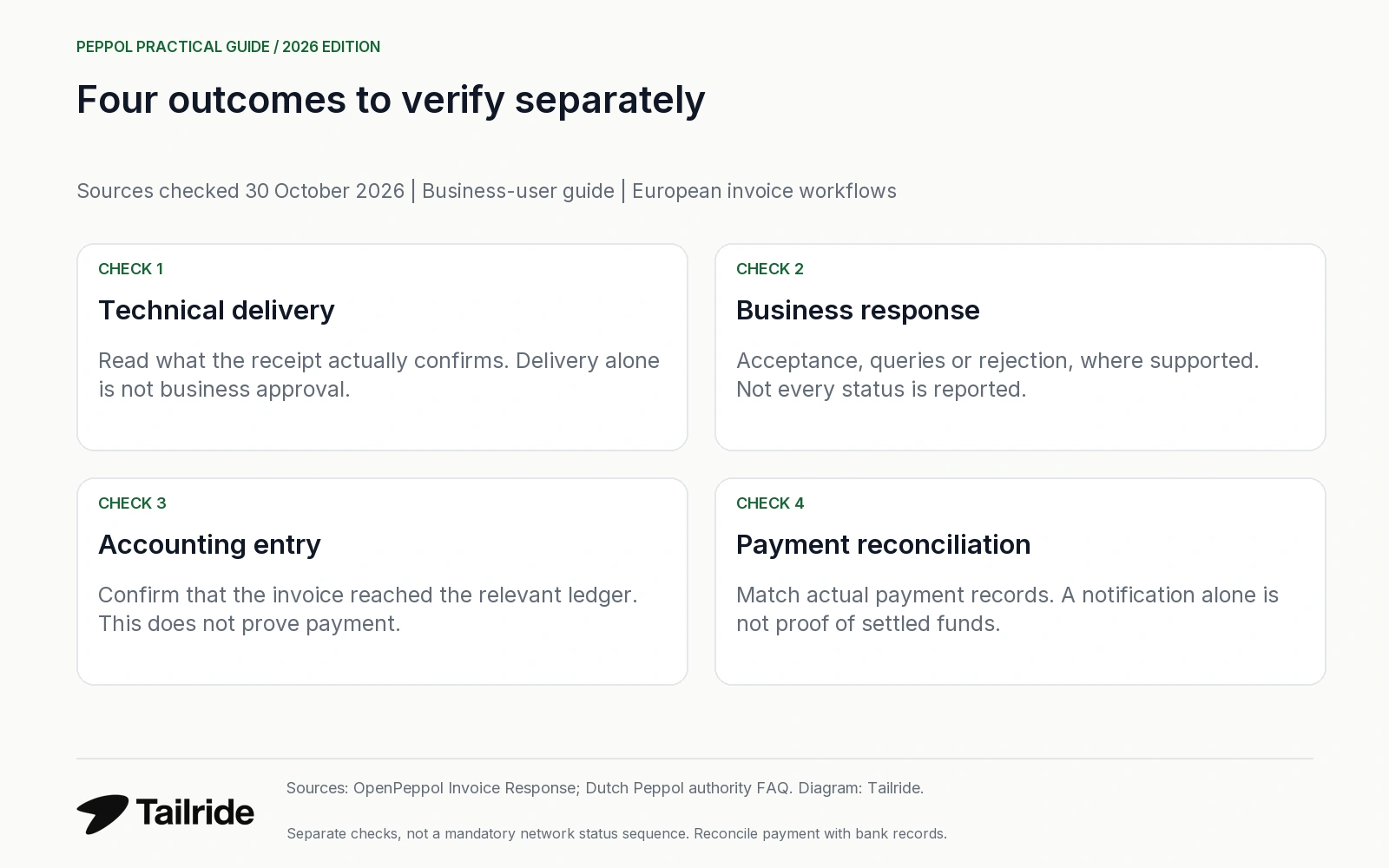
Delivery, acceptance, bookkeeping and payment are different checks
| Checkpoint | What it tells you | What it does not prove |
|---|---|---|
| Technical delivery | A message reached the point identified by the provider's receipt | The customer approved the amount or posted the invoice |
| Business response | A customer reports acceptance, a query or rejection, where supported | That funds have settled in your bank account |
| Accounting entry | The invoice was recorded in the relevant ledger | That it has been paid |
| Payment reconciliation | Bank or payment records are matched to the invoice | That every earlier network event was successful |
OpenPeppol distinguishes transport acknowledgements from Invoice Response business messages. The latter is not universally mandatory, and not every status must be reported. Ask your provider what its displayed labels mean and whether customer responses are supported. A “paid” notification should still be reconciled with actual payment records. Invoice Response specification, Dutch authority FAQ.
Technical reporting is evolving: the Dutch authority describes the July 2026–March 2027 rollout of Message Level Status (MLS) as the successor to MLR. For an end user, the important question is which technical failure or customer decision the application actually exposes, rather than whether every provider uses the same screen label. Current FAQ.
Common Peppol errors and what to check first
| Symptom | First check | Next action |
|---|---|---|
| Recipient not found | Exact scheme, registered value, environment and document capability | Ask the provider to perform network lookup; do not rely only on Directory search |
| ID already registered elsewhere | Existing accounting software or previous provider | Arrange a coordinated migration before cancelling the old connection |
| Missing buyer or order reference | Actual customer instructions and rule R003 | Obtain the correct reference and correct the affected document |
| VAT, line or total validation error | The error code and original structured values | Correct the source data; do not fix only the PDF view |
| Delivered but customer cannot see it | Meaning of the delivery result and customer import queue | Trace using message ID, recipient ID and timestamp |
| Customer rejects a delivered invoice | Commercial reason, order details or pricing | Resolve the business issue and use the required correction process |
| Duplicate after a retry | Original transmission and invoice number | Confirm outcome before resending or creating another invoice |
The references and calculation examples come from R003 and R120; the distinction between technical and business outcomes comes from Invoice Response. Other troubleshooting actions are practical recommendations to discuss with the provider.
Cross-border checks for European businesses
For a German public customer, obtain both the correct Peppol receiver address and the required Leitweg-ID in the invoice. For France, confirm the role of the plateforme agréée: Peppol certification alone does not replace French platform requirements. An Italian route can involve SdI arrangements beyond a participant registration. German federal guidance, DGFiP on Peppol France, AgID.
For Spanish or Portuguese public and domestic processes, confirm the actual national interface and accepted profile rather than assuming that a generic Peppol account replaces them. Spain's B2B framework and Portugal's FE-AP arrangements have their own requirements. Spanish framework, eSPap FAQ. The full country calendar stays in our requirements guide; adoption data stays in e-invoicing statistics.
Where Tailride fits after the Peppol exchange
As checked on 30 October 2026, Tailride's e-invoice page states that it does not act as a Peppol Access Point. It reads supported Peppol/UBL files received by email, downloaded or uploaded through supported sources. If your provider makes the original invoice available, you can use that supported file workflow for downstream review. This is conditional on the provider's export and your chosen source, not an automatic connection between every Peppol service and Tailride. Tailride e-invoices.
Tailride preserves the original XML and provides a readable PDF view. Verify your own export, accounting and retention arrangements separately. For format identification and file processing, see our ZUGFeRD, Factur-X and XRechnung guide. Original-file documentation.
Frequently asked questions
Do the sender and customer need the same Peppol provider?
No. The four-corner model supports different sending and receiving providers. The recipient still needs to support the relevant document and process. OpenPeppol.
Is my Peppol ID always my VAT number?
No. It combines a scheme and value. Company-register numbers, VAT identifiers and public-sector identifiers are among the available schemes; local rules and registration determine which to use. Official code list.
Can I change my Access Point provider?
Yes. Coordinate the identifier migration, timing and access to historical documents with both providers. AgID explicitly describes moving the participant identifier from the old intermediary to the new one. AgID migration FAQ.
How long does Peppol registration take?
There is no universal small-business activation time established by the sources used here. Verification, an existing registration, software setup and provider support can affect readiness. Ask for milestones and confirm sending and receiving separately.
Can I send a PDF instead?
A plain PDF is not the structured invoice required by a Peppol billing profile. An attached readable copy may be useful, but it does not replace the required structured content. Peppol BIS Billing.
Scope and verification
Sources were checked on 30 October 2026. This guide covers business users connecting through a provider. The comparison questions and first-exchange checklist are Tailride recommendations, rather than official certification requirements. Prices, activation times and interface labels vary by provider. Confirm the supported profile and national requirements for your transaction. Diagrams explain the workflow.
