Every transaction coded to your chart of accounts — automatically
Tailride doesn't just capture a bill, it codes it. Line by line, it works out what each item is, recognises the supplier, and assigns the right account and tax code from your chart of accounts — learning from your books as it goes.
Capture is the easy part. Coding is where the time goes.
They read it, then hand it back
They pull the vendor and the total, and leave the rest to you — so you still choose the account for every bill, line by line, month after month. Coding stays manual.
With Tailride
Coding is the job, not an afterthought. Each line is categorised against your own chart of accounts automatically — vendor-aware and learning from your books — so bills arrive ready to review, not build from scratch.
One bill, coded and posted
A supplier bill lands, Tailride reads every line and codes it against your chart of accounts, and the bill goes straight to Xero — start to finish, no manual coding.
Coded line by line, not just the total
A single invoice rarely belongs to a single account. One supplier bill can mix software, hardware, travel and fees — so Tailride codes each line item on its own, not just the header total.
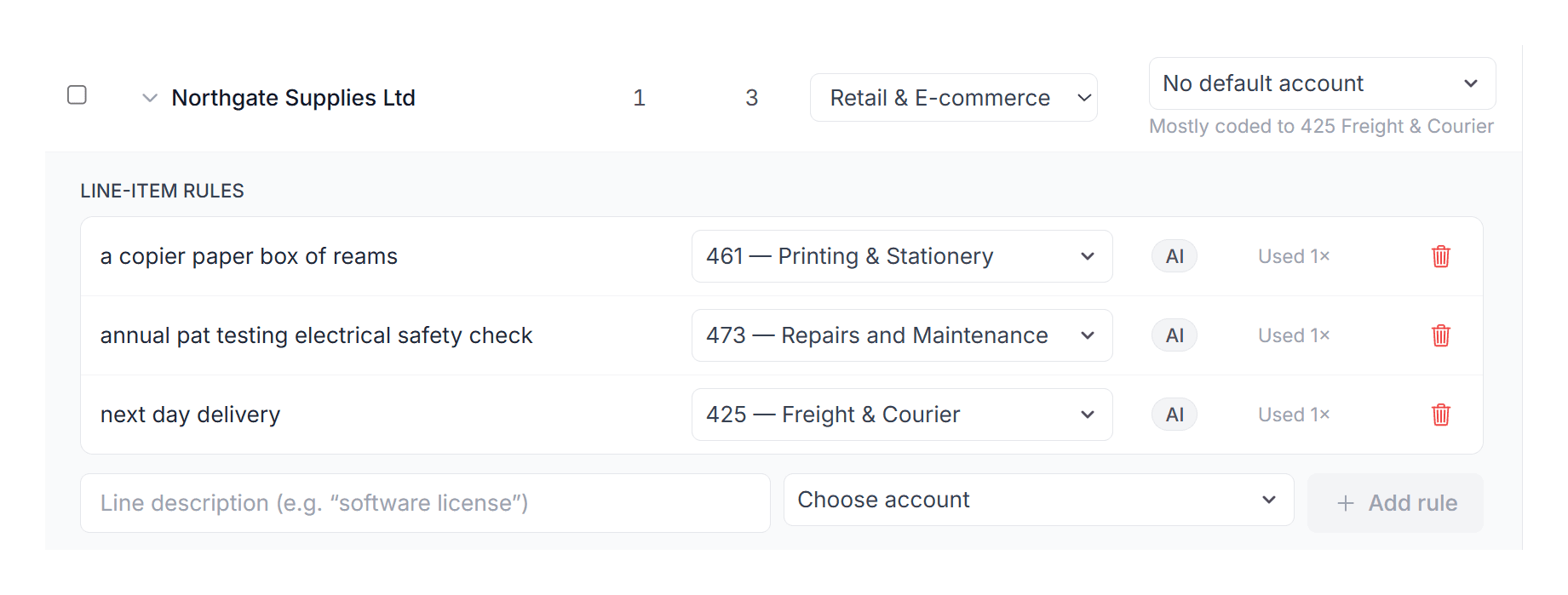
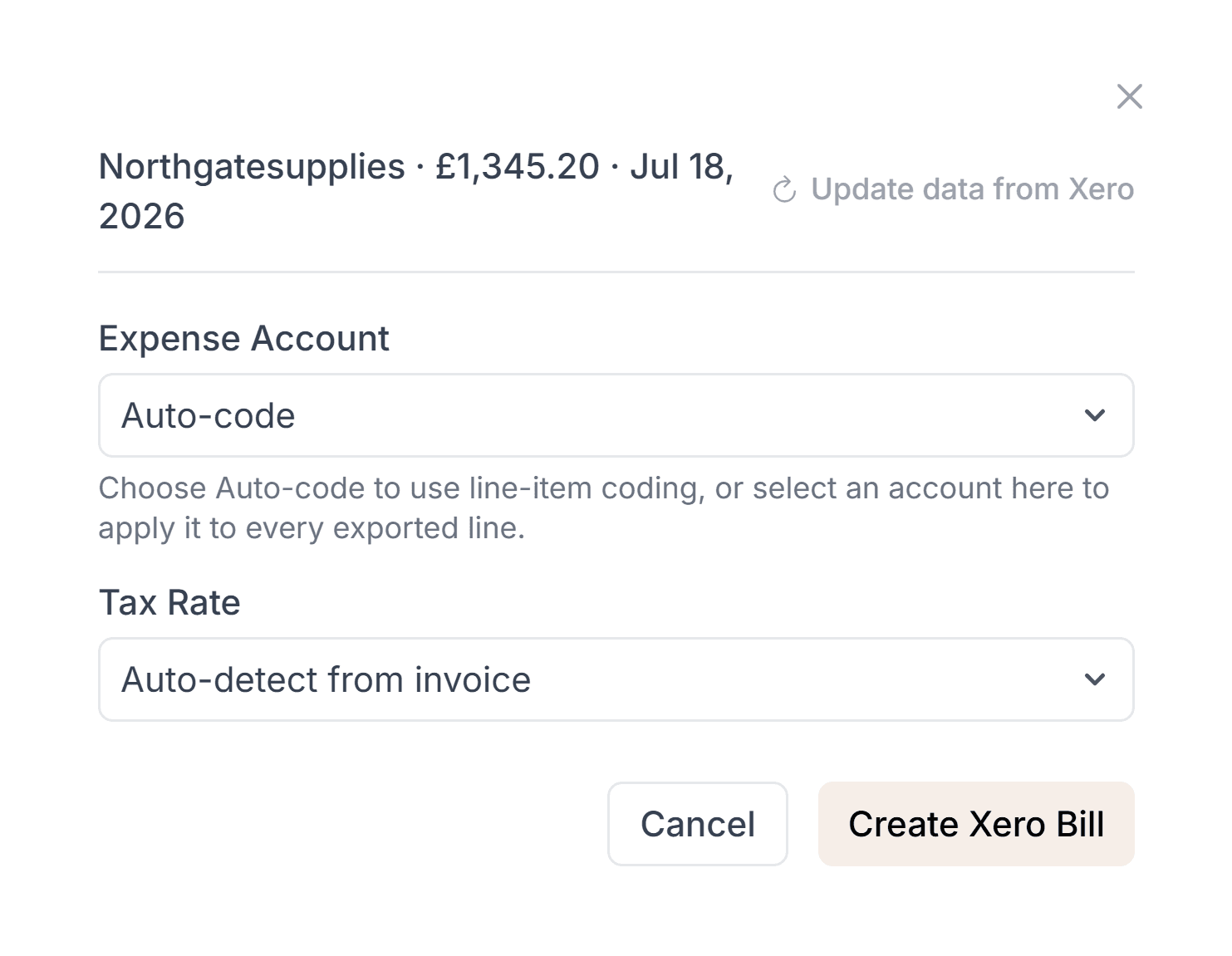
It works out what each line is from the context of the document and who the supplier is, then assigns the account that line belongs to. At export you can keep that per-line coding, or apply one account to the whole bill.
It knows the supplier — and codes accordingly
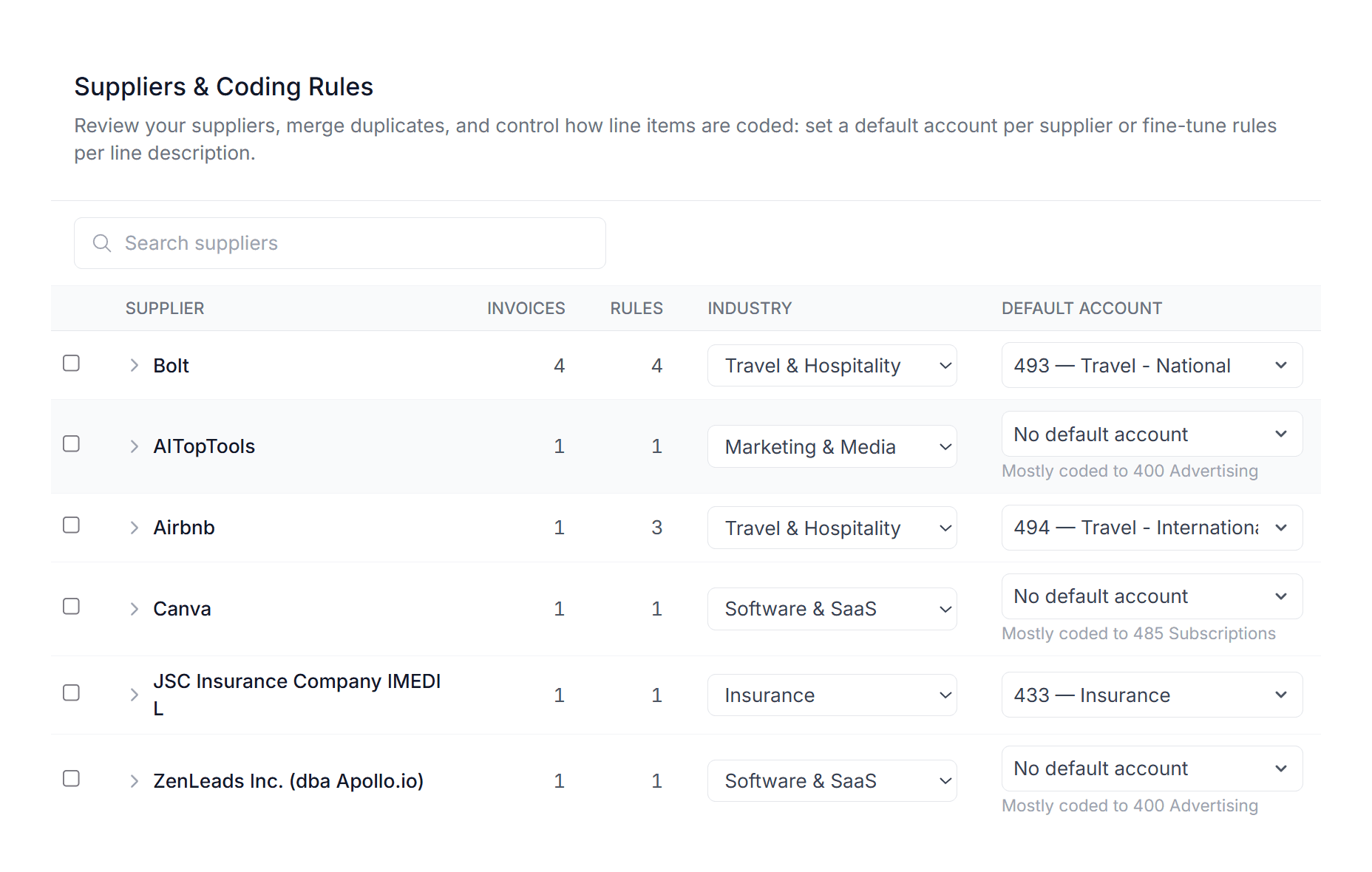
Coding isn't guesswork from keywords. Tailride recognises who issued the invoice and applies the accounts that supplier's spend belongs to — so a cloud provider, a courier and a law firm each land where they should, automatically.
You stay in control of it, too: set a default account per supplier, fine-tune rules per line description, or merge duplicate suppliers — so the coding reflects how your books actually work, not a generic rule that misfires the moment a vendor's wording changes.
It gets sharper with every correction
Tailride learns per client and per workspace. Each time you adjust a code, it remembers — so the next invoice from that supplier, and similar ones, are coded more accurately without you touching a rule.
There's nothing static to maintain. Instead of a brittle rules list, you get coding that quietly improves the more you use it — tuned to each set of books, not a one-size-fits-all default.
Change the account on a line Tailride got wrong.
Saved for that supplier and that line description.
Same supplier, same line — already in the right account.
It brings in the coding you already have
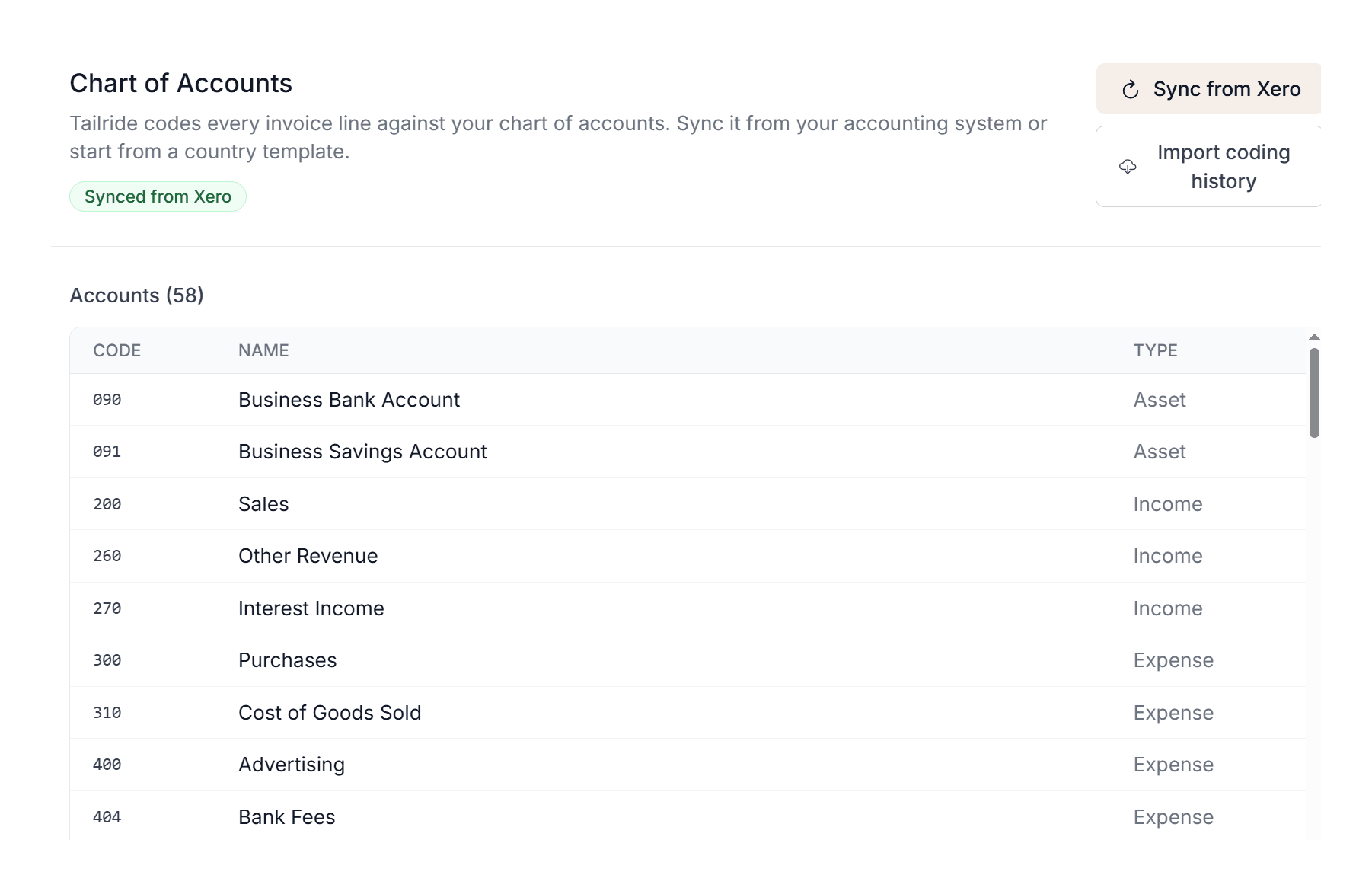
You've already categorised thousands of transactions in your accounting software. Sync your chart of accounts and import your coding history in a click — or start from a ready-made country template — so Tailride begins from how you actually book things, not a blank slate.
From day one it codes the way your ledger already does, then refines from there as you review.
How the coding works
From a raw bill to a coded, ready-to-post transaction — in four steps.
Capture the bill
Tailride collects invoices from your inbox, vendor portals and messengers, and reads the full document with AI.
Read every line, identify the supplier
It extracts each line item and recognises who issued the invoice — the two things real coding depends on.
Match to your chart of accounts
Using your existing coding and what it has learned, it assigns the right account and tax code to each line.
Review, approve — it learns
You confirm or adjust, the transaction syncs to your accounting software, and every change makes the next one sharper.
Built to be trusted, not just fast
Tax codes too
Each line gets the right tax rate as well as the account, so VAT and sales tax land correctly, not just the category.
Reads any layout
No per-supplier templates. The AI understands line items on invoices it has never seen before.
A review, not a rebuild
Coding is suggested for you to confirm. You stay in control, but you're checking work instead of doing it.
Improves over time
Every correction feeds back per client, so accuracy climbs the longer you use it.
Straight to your ledger
Coded transactions post to QuickBooks, Xero, Odoo, sevDesk, Lexware Office, e-conomic, Sage, FreeAgent or Holded, line items and all.
Clean audit trail
The original document stays attached to every coded transaction, so anything is easy to check later.
Codes into the software you already use
Straight to the chart of accounts in your accounting system.
Automatic coding — common questions
Does Tailride code every line item, or just the invoice total?
Every line. A single invoice can hold several different expense types, and Tailride codes each line separately, working out what it is from the document context and the supplier.
How does it know which account to use?
It recognises who issued the invoice and reads each line in context, then assigns the account and tax code from your chart of accounts that the spend belongs to — rather than guessing from keywords.
Does it learn from my corrections?
Yes, and it does it per client or workspace. Every time you adjust a code, Tailride remembers, so coding gets more accurate with each invoice you review — no static rules to maintain.
Can it use the coding I already have in QuickBooks or Xero?
Yes. Tailride can pull in your existing categorisation from your accounting software, so it starts from how you already book things instead of a blank slate — no rules to build by hand.
Which accounting software does it code for?
Tailride codes to the chart of accounts in QuickBooks, Xero, Odoo, sevDesk, Lexware Office, e-conomic, Sage, FreeAgent and Holded. Microsoft Business Central receives exported invoices, but its chart of accounts isn't synced for coding.
What if I'm not connected to accounting software yet?
You can start from a ready-made country chart-of-accounts template, then sync your real chart of accounts and import your coding history whenever you connect QuickBooks, Xero, Odoo, sevDesk, Lexware Office, e-conomic, Sage, FreeAgent or Holded.
What if a code is wrong — am I still in control?
Completely. Coding is suggested for you to review and approve. You can change anything, and each change teaches Tailride for next time.
Can it fill in tracking categories, classes or departments?
Yes, for Xero (up to two tracking categories on each line), QuickBooks (a class on each line, a department or location on the bill), Sage (up to three analysis types such as department, cost centre or project) and e-conomic (up to three dimensions). Sync the options from your accounting software in Settings → Cost tracking, then add rules that pick the site, department or project from the delivery address or the PO number. A value you set by hand is never overwritten.
Can I export a single line instead of every line item?
Yes. Each accounting integration has a Send line items switch. Switch it off and Tailride exports one line for the total — or one per VAT rate when the invoice has several — using your default account unless all lines share one. With Automatic export on, invoices whose lines are all coded go to your accounting software without a click.
Related Features & Solutions
Stop coding invoices by hand
Let Tailride read every line, recognise the supplier, and code each bill to your chart of accounts — then learn from you as it goes.
