Extract invoices and receipts from email.
Automatically scan Gmail, Outlook, Yahoo and any IMAP inbox for invoices and receipts. Get bulk scanning for past emails. Tailride checks your inbox every hour, detecting new invoices and extracting their data automatically.
Trusted by 2,800+ businesses in 108+ countries









See Email Invoice Extraction in Action
Watch how Tailride automatically extracts invoice data from your email.
Why Choose Tailride for Email Invoice & Receipt Scanning?
Invoice detection built for real inboxes: attachments, email bodies and links
Universal Email Support
Works with Gmail, Outlook, Yahoo, IMAP, and all major email providers
Hourly Processing
Invoices are automatically detected and processed every hour
Smart Detection
AI identifies invoices and receipts in PDFs, images, email body text, and behind URLs
Privacy Protected
Your emails never leave your inbox. Native connection ensures security
Retroactive Scanning
Scan historical emails in bulk to find missed invoices and receipts from previous quarters
99.2% Extraction Accuracy
Fields read correctly on our test set of 1,000+ documents, with 98.2% of documents correctly identified
How It Works
Automated Email Invoice Extraction in 3 Steps
From inbox to structured data, automatically. No coding, no manual work.
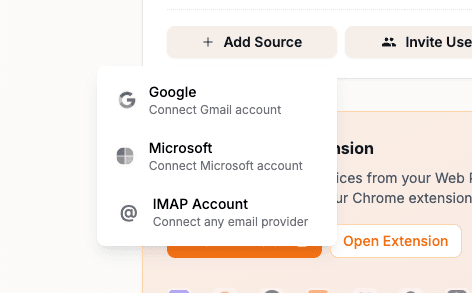
Connect Your Email
Securely link Gmail, Outlook, or IMAP in a few clicks. OAuth keeps credentials safe.
- OAuth 2.0 for Gmail and Outlook—no password storage
- Multiple accounts supported
- Works with Google Workspace & Microsoft 365
AI Scans & Extracts
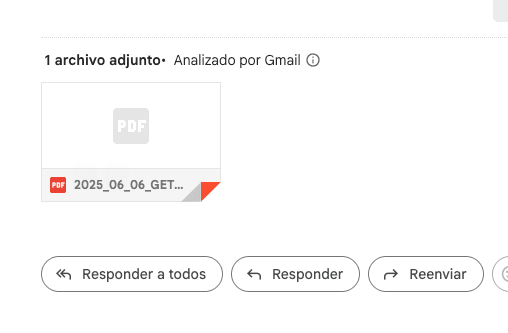
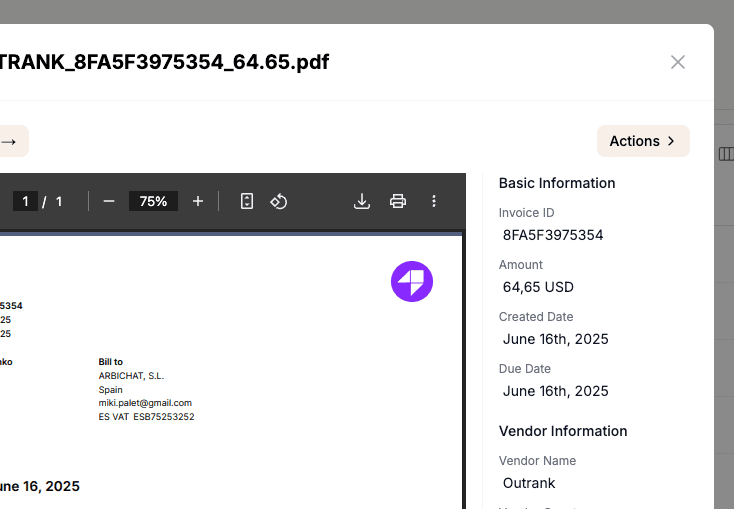
Every hour, our AI checks your inbox, detects invoices in PDFs and images, and extracts vendor, amounts, dates, and line items.
- Hourly and bulk scanning
- Vendor, totals, tax and line items extracted
- Handles PDF, PNG, JPG, TIFF
Export & Integrate
Push to QuickBooks, Xero, Sage or another connected ledger, sync to Google Sheets, or export CSV. Webhooks and API available for custom workflows.
- Direct accounting software sync
- Custom field mapping
- Webhook & API access
Advanced Email Invoice Extraction Features
Go beyond basic data extraction with features built for teams that process invoices at volume.
Smart Duplicate Detection
Advanced algorithms identify duplicate invoices across multiple email accounts and time periods, preventing double payments and maintaining clean financial records.
- Prevent duplicate payments
- Clean financial data
- Cross-account detection
Multi-Currency Processing
Tailride detects the currency on every invoice and processes invoices in any currency, so multi-currency businesses keep everything in one place.
- Any currency on the invoice
- Currency detected automatically
- Tax amounts and rates extracted
Intelligent Line Item Extraction
Extract detailed line items including product descriptions, quantities, unit prices, and tax information from complex multi-page invoices with variable formatting.
- Detailed item breakdown
- Quantity and pricing
- Tax itemization
Use Cases for Email Invoice Extraction
From freelancers to enterprises—automate invoice capture across your organization.
Freelancers & Small Business
Stop chasing invoices from clients and vendors. One inbox, automatic extraction.
- ✓Connect personal and business email
- ✓Export to spreadsheets or accounting software
- ✓No more digging through emails
Accounting Teams
Centralize invoice capture from multiple departments. Reduce manual data entry and errors.
- ✓Multi-account support
- ✓Bulk historical scanning
- ✓Direct sync to QuickBooks, Xero and more
Enterprises
Scale invoice processing across departments. Custom workflows, API, and dedicated support.
- ✓Custom integrations
- ✓Approval workflows
- ✓Dedicated support
Estimate the Cost of Manual Invoice Processing
See what processing email invoices by hand costs you today. Adjust the parameters below to match your current workflow.
Your Current Process
What manual processing costs you
Based on your inputs, processing invoices by hand takes your team about 42 hours and $1,042 every month. That is the work Tailride automates.
* An estimate based only on your inputs: invoices × minutes per invoice × hourly rate. It shows what manual processing costs you today; how much of it you save depends on your workflow.
Success Stories
Real Results from Email Invoice Extraction
See how businesses like yours are saving time and eliminating manual work with Tailride's email invoice extraction capabilities.
How Magier Saved 20+ Hours Monthly
The Challenge
Co-founder Max was drowning in manual invoice collection from multiple email accounts and vendors, spending over 20 hours monthly on accounting tasks that took away from business growth.
The Result
Automated invoice collection from all email accounts, eliminated manual data entry, and reduced accounting time from 20+ hours to under 2 hours monthly.
“As a founder myself, I was always drowning in accounting work. Tailride makes my life super, super easy. I can only recommend it for all companies out there.”

 Magier
Start Scanning Your Inbox Today
Join 2,800+ businesses in 108+ countries that use Tailride to find the invoices in their inboxes
Using Proton Mail?
Proton keeps your mail private, so cloud tools can't read it. Tailride Desktop reads it on your own Mac or PC, skips what clearly isn't an invoice, and sends the likely invoices to Tailride.

 Get the desktop app
 Invoices from Proton Mail
Frequently Asked Questions
Everything you need to know about inbox scanning
How does inbox scanning work?
Tailride connects directly to your email account and checks it every hour for new emails containing invoices and receipts. Our AI analyzes email subjects, content, and attachments to identify invoices, then extracts all relevant data automatically so you get everything organized without manual work.
Can I bulk scan my inbox to get past invoices and receipts?
Yes. Use retroactive scanning to extract invoices and receipts in bulk from any timeframe: this month, last quarter, year-to-date, or your entire mailbox. Results appear progressively so you can start working while the rest processes.
Which email providers are supported?
We support Gmail, Google Workspace, Outlook, Microsoft 365, Yahoo Mail, and any IMAP-compatible email service. Proton Mail works through the Tailride desktop app. Connecting a mailbox takes a few clicks.
Can I scan old emails for missed invoices?
Yes! Our retroactive scanning feature can search through your entire email history in bulk to find missed invoices and receipts. You can choose to scan the last month, quarter, year, or your entire inbox.
What exactly do you extract from emails?
We extract invoices and receipts from attachments (PDF, images), email body text, or links. From each document we get vendor, dates, totals, taxes, currency, invoice number, PO, payment terms, and line items when present.
Is my email data secure?
Absolutely. Your emails never leave your inbox. We use secure OAuth connections and only access the specific emails containing invoices. We're CASA Tier 2 certified and GDPR compliant.
What types of invoices can be detected?
Our AI detects invoices in PDF attachments, images, email body text, and even behind links/URLs. We handle invoices from any vendor in any format, including receipts, bills, and statements.
How accurate is the invoice detection?
On our test set of 1,000+ documents, Tailride correctly identifies 98.2% of documents as invoices or receipts (or not) and reads 99.2% of fields correctly. Actual results can vary with document quality and layout.
How do I get the extracted data out?
Export to CSV/Excel, sync to Google Sheets, or push to QuickBooks, Xero, Business Central, Odoo, sevDesk, Lexware Office, e-conomic, Sage, FreeAgent or Holded. You can also use our API or webhooks to get invoice and receipt data wherever you need it.
Can I connect multiple email accounts?
Yes. Connect as many mailboxes as your plan includes — Gmail, Outlook, Yahoo or any IMAP account — so invoices sent to different people and addresses all end up in one dashboard.
What happens if the AI misses an invoice?
While rare, you can manually upload any missed invoices or use our browser extension. The AI learns from these cases to improve future detection accuracy.
Can I choose which folders or labels are scanned — including Sent?
Yes. For each mailbox you can pick the Gmail labels, Outlook folders or IMAP and Yahoo folders to scan. Without a selection, Tailride scans the whole mailbox except Sent, Drafts, Trash and Spam — so select Sent yourself if invoices you need also sit there.
Can I stop Tailride from picking up mail from certain senders?
Yes. Add an email address or a whole domain under Skip rules in Settings, and Tailride ignores mail from it in every scan — handy for the newsletters of suppliers you also buy from.
Can I hide invoices I've already dealt with?
Archive them. Archiving one or many invoices hides them from the list without deleting anything: the files, the Google Drive and Sheets copies and the accounting exports stay as they are. Turn on Show archived documents in the filters to see them again.
Can I extract data from image-based invoices in emails?
Yes, our OCR technology can extract data from both text-based PDFs and image-based invoices, including scanned documents, photos, and faxes. We support PNG, JPG, TIFF, and multi-page PDF formats.
What data fields can be extracted from email invoices?
We extract the fields you need for accounting, including vendor information, invoice numbers, amounts, dates, line items, tax details, payment terms, and more. The extracted data is structured and can be customized based on your specific requirements.
How does email invoice extraction handle multiple currencies?
Tailride reads the currency on every invoice, whatever it is, and keeps multi-currency invoices organized in one place. When you reconcile a bank statement, payments in another currency are matched at the exchange rate of the transaction date.
See how Tailride compares
Side-by-side comparisons with the tools you might be switching from — honest about where each one wins.
