Automate Backlogged Invoices with Retroactive Scanning
Stop chasing old invoices manually. Tailride scans your full email history, extracts every document, and pushes structured data directly to Xero or QuickBooks.
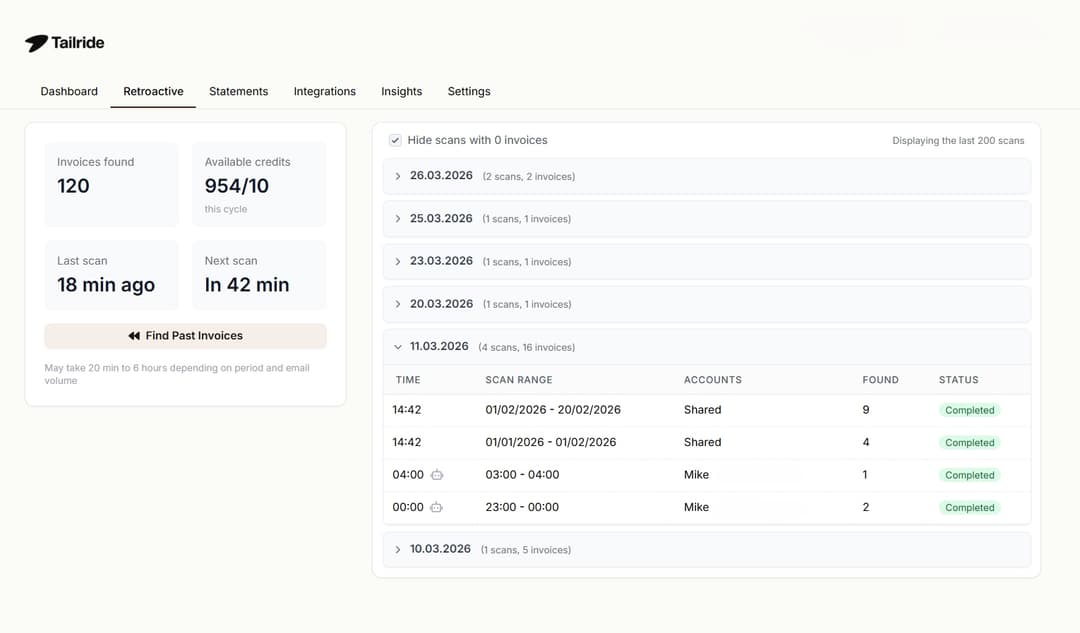
Built for Anyone With an Invoice Backlog
Retroactive invoice scanning software solves a specific bottleneck — when historical data needs to be structured, fast.
Finance Teams & Business Owners
System migrations and year-end audits expose gaps in historical AP records. Tailride closes those gaps by fetching and structuring every invoice you've ever received — without touching your team's time.
Scale-ups & SaaS Companies
When your vendor stack grows to 15+ tools, billing emails pile up across dozens of threads. Tailride scans your entire inbox history to surface every invoice — regardless of sender, format, or how far back it goes. For portal-based fetching, see Online Portals →
Accounting Firms
Stop sending zip files to your accountant. Connect your inbox once and Tailride automatically surfaces every invoice, receipt, and billing document — organised, extracted, and ready for your bookkeeper to review without the back-and-forth.
The Bottleneck of Historical Invoice Data
Vendor-by-vendor manual exports
Staff export PDFs page by page from Amazon Business, SaaS billing portals, and email — one vendor, one folder, one client at a time. For founders and lean teams, chasing these documents is a massive drain on growth resources.
Inbox archaeology at scale
Historical invoices are buried in Gmail threads and Outlook folders across years of correspondence. There is no built-in tool to surface every billing document from a specific vendor or date range — until you connect your inbox to Tailride.
Audits expose record gaps
Preparing for a financial audit or system migration reveals invoices that were never captured in the first place. Reconstructing that backlog manually means lost VAT/tax write-offs and weekends wasted on manual data entry — hours that don't scale when you process backlogged invoices across multiple accounts.
“Co-founder was drowning in monthly accounting work, spending hours collecting invoices from various sources and manually reconciling transactions.”— Magier · Technology · Read full case study →
How Tailride's Retroactive Scanning Works
Four steps from inbox connection to structured data in your accounting software.
Connect Your Email Inbox
Authorise Gmail, Outlook, Microsoft 365, or any IMAP inbox via OAuth in under two minutes — no passwords stored, no forwarding rules required. Tailride immediately gains read access to your full message history and can begin scanning from any date you choose.
GmailOutlookMicrosoft 365Yahoo MailAny IMAPAlso need portal-based fetching (Amazon Business, Stripe, etc.)? See Online Portals →
Automated Historical Fetching
Set a date range — this month, this quarter, this year, or full account history. Tailride systematically scans every email thread in the selected range, surfacing every billing document — attachments, inline HTML invoices, and plain-text receipts — without manual input. Large backlogs are processed as background jobs in batches.
Full inbox historyCustom date rangePDF & HTML attachmentsBackground processingAI Line-Item Extraction
Each retrieved document passes through Tailride's LLM-based extraction engine, which identifies vendor name, invoice number, date, subtotals, tax, and individual line items — from PDFs, HTML billing pages, and email attachments. This is how businesses and accountants extract line items from past emails at scale.
LLM-basedVendor nameInvoice numberTax & line itemsOne-Click Export to Accounting Software
Structured data exports to Xero, QuickBooks, Google Sheets, or CSV in bulk — all fields mapped, no reformatting. Keep your books tax-ready and close your month-end in minutes without touching a single spreadsheet. This completes the end-to-end AP automation loop from historical document collection to your general ledger.
XeroQuickBooksGoogle SheetsBulk export
Watch How Retroactive Scanning Works
See how Tailride connects to your historical inbox archives, uncovers missing invoices from past years, and exports them directly into your accounting software.
Tailride vs Traditional OCR: Why Hubdoc and Dext Fall Short
Businesses and accountants switching from document-capture tools hit the same wall: Hubdoc and Dext only process what you give them — they don't go looking for what's missing. As the best alternative to Hubdoc for historical data, Tailride eliminates the need for manual uploads by connecting directly to the source.
| Feature | TailrideRECOMMENDED | Hubdoc | Dext Prepare |
|---|---|---|---|
| Best For | Founders, scale-ups, and finance teams needing zero-touch historical automation | Basic document capture — Xero-native users | Forward-scanning with OCR extraction |
| Retroactive Email Scanning | ✅ Direct inbox API — unlimited history | ❌ Email forwarding only | ❌ Email forwarding to submission address |
| Automated Portal Fetching (separate feature →) | ✅ Yes — Chrome Extension, 20+ portals | ❌ Fetch retired April 2022 | ⚠️ Available — subject to 2FA & credential re-auth errors |
| Custom Historical Date Range | ✅ Any range — full account history | ❌ Not available | ⚠️ Selectable at Fetch setup, portal-dependent |
| Extraction Engine | ✅ LLM-based | ⚠️ Basic OCR | ⚠️ ML-based OCR — no LLM pipeline |
| Multi-Client Dashboard | ✅ Master Dashboard — per accounting firm | ⚠️ Basic | ⚠️ Limited |
| Export to Xero / QuickBooks | ✅ Native | ✅ Native (Xero-owned) | ✅ Native |
* Hubdoc Fetch officially retired 27 April 2022 by Xero due to "diminished performance and functionality." Sources: WLM Accounting, Xero Blog. Dext Fetch connection errors documented in official Dext troubleshooting documentation.
Ready to automate your historical invoice collection?
Connect your inbox in under 5 minutes. Tailride scans your full email history, extracts every invoice, and exports structured data to your accounting software — automatically.
Supported Inboxes for Historical Document Collection
Retroactive scanning works with any inbox you already use — whether you're a solo founder, a growing business, or an accounting firm. Connect once, Tailride handles the rest.


Need to fetch invoices directly from vendor portals?
Amazon Business, Stripe, Google Ads, Meta Ads, and 20+ billing portals are covered by a separate Tailride feature — the Online Portals Chrome Extension. It handles sources that don't send email at all.
Frequently Asked Questions
What is retroactive invoice scanning?
Retroactive invoice scanning software automatically searches past email history to extract backlogged invoices, parse their line items, and export structured data to accounting systems. Unlike traditional OCR tools that only process files you manually upload, retroactive scanning retrieves the source documents itself — covering months or years of history without staff involvement.
How far back can Tailride scan emails for invoices?
Is Tailride a replacement for Dext or Hubdoc?
Which email providers are supported?
Is the Chrome extension required for retroactive email scanning?
Does it integrate with Xero and QuickBooks?
Ready to clear your invoice backlog?
Connect your inbox today. Tailride scans your full email history, extracts every invoice, and exports clean structured data — no manual downloads, no re-entry.
