How to Get Invoices into sevdesk (2026)
Every route into sevdesk step by step - email, app, upload, E-Rechnung - which plan each needs, and what Tailride collects that none of them reach.

Last updated: August 2026 · ~11 min read · Published by Tailride
sevdesk gives you four ways to get a supplier invoice into the books, and they are all easy once you know which one applies. The part that catches people out is not the setup. It is that two of the four are switched off on the cheaper plans, and that nothing in the list goes and finds a document you have not already got hold of.
This guide covers each route in order, what sevdesk reads once the document is in, how it leaves again on its way to your Steuerberater (tax adviser), and the category of invoice that no route reaches.
Where we fit: Tailride is the layer in front. It reads invoices out of Gmail, Outlook and IMAP including the ones that are only a download link, signs into supplier portals that never email you at all, works backwards through your history as far as you need, then codes every line to SKR03, SKR04 or your own chart of accounts and writes a finished voucher into sevdesk with the PDF attached. Ten invoices a month are free, then from €12 a month billed annually. See the sevdesk integration →
Short answer
Four routes in, one route out:
-
Email forwarding - suppliers or your team send to a sevdesk address.
-
Mobile app - photograph a receipt, or pull a file from Dropbox or Google Drive.
-
Drag and drop - upload straight into the browser.
-
E-Rechnung - ZUGFeRD and XRechnung arrive as structured data, so nothing has to be read at all.
-
Out again - the DATEV Rechnungsdatenservice, which your Steuerberater has to order before you can switch it on.

All four inbound routes need the Accounting plan or above. On the entry plan you can send invoices, not capture them.
Then a fifth category that is not a sevdesk feature: the invoices sitting in portals, behind links, and in last year's inbox. Those never enter any of the four queues, because nobody put them there.
Check your plan before anything else
There are three paid plans - Invoice, Accounting and Accounting Pro, sold in Germany as Rechnung, Buchhaltung and Buchhaltung Pro - plus a free Kostenlos tier on the German site. sevdesk notes on its own pricing page that plan contents vary by country, so check the version that applies to you.
Four rows decide whether the routes below are available to you at all:
| Feature | Invoice | Accounting | Accounting Pro |
|---|---|---|---|
| Creating e-invoices (ZUGFeRD, XRechnung) | ✓ | ✓ | ✓ |
| DATEV / ADDISON integration, invite your tax adviser | ✓ | ✓ | ✓ |
| AI-supported receipt capture | - | ✓ | ✓ |
| Capturing e-invoices | - | ✓ | ✓ |
| REST API | - | - | ✓ |
Three consequences worth reading twice.
Capture starts at Accounting. On the Invoice plan you can raise invoices to your customers and send them as XRechnung or ZUGFeRD, but incoming supplier documents are not read for you and incoming e-invoices are not processed. Everything this guide describes about getting documents in needs Accounting or above. The German pricing page lists capture by email (Belege per Mail erfassen) on the same two tiers.
The REST API is Accounting Pro only. That matters if you plan to connect anything external - including Tailride, which authenticates with a sevdesk API token. Worth confirming with sevdesk before you buy on the strength of an integration.
The DATEV route is not gated. DATEV and ADDISON integration and inviting your tax adviser sit on every paid plan, including the cheapest. The handover to your Steuerberater is the one part of this you do not have to upgrade for.
What it costs
List prices, per month, net of VAT:
| Plan | Billed monthly | Billed annually | Billed every two years |
|---|---|---|---|
| Invoice | €11.90 | €9.90 | €8.90 |
| Accounting | €25.90 | €22.90 | €19.90 |
| Accounting Pro | €34.90 | €30.90 | €27.90 |
sevdesk was running a promotion of up to 60% off the first six months at the time of writing, and runs them often, so the price you see quoted may be an introductory rate rather than what you pay in month seven. The trial is 14 days with no card required.
The number to plan against is the Accounting line, because that is where capture begins - or Accounting Pro if you need the API.
Route 1: Forward invoices by email
The route most businesses end up living on, because it needs no habit change from anyone.
sevdesk issues your account an email address. Anything sent to it lands in the document queue, gets read automatically, and waits for you to confirm before it is posted.
Two ways to feed it:
Tell suppliers directly. Update the billing contact with the suppliers who bill you monthly, and their invoices arrive without a person in the loop. Worth doing for the ten or fifteen suppliers that account for most of your volume.
Forward from your own inbox. Everything else. A rule in Gmail or Outlook that forwards mail from known billing addresses does most of this without daily attention.
The limitation to plan around: the address accepts what is sent to it. It does not go looking. If an invoice email never reaches the person doing the forwarding, or reaches them and gets buried, sevdesk has no way to know a document is missing. That gap is the subject of the section further down on what none of these routes reach.
Route 2: The mobile app
For documents that were never a digital file. Fuel, parking, lunch with a client, the hardware shop receipt in a coat pocket.
The sevdesk app runs on iOS and Android. Photograph the receipt and it uploads into the same queue as everything else, read the same way.
Less obviously, the app also uploads from Dropbox and Google Drive. Useful if your team already drops documents into a shared folder, because it turns an existing habit into an intake route instead of asking anyone to change what they do.
The practical advice with paper is to make the photograph the moment of capture, not a batch job on the last day of the month. A receipt photographed at the till is a document; a receipt in a drawer is an intention.
Route 3: Drag and drop into the browser
The plain one. Open sevdesk, drag files in, they queue up for review.
sevdesk accepts PDF, JPG, PNG and XML. The XML matters and is easy to miss - it is how a structured e-invoice gets in when somebody has saved the file to their machine rather than letting it arrive electronically.
Upload is the right route for the odd document that does not belong to a pattern, and the wrong route for anything that repeats. If you find yourself uploading the same supplier every month, that supplier belongs on route 1 or route 4.
Route 4: Let the invoice arrive as data instead of a PDF
The route worth setting up even though it takes the longest, because it removes reading rather than speeding it up.
sevdesk receives and processes ZUGFeRD and XRechnung, the two German e-invoice formats. Files are validated on arrival and posted automatically, at no charge beyond the plan price.
One distinction the pricing page makes and most write-ups miss: creating e-invoices sits on every paid plan, capturing them starts at Accounting. Being able to send an XRechnung to your customer does not mean your account can receive one from a supplier.
The difference from the other three routes is what happens after receipt. A PDF has to be interpreted: something has to decide which number on the page is the invoice total and which is the previous balance. An XRechnung does not, because every value already sits in a named field that sender and receiver both understand. There is no extraction step to get wrong, because nothing is extracted.
Two practical notes.
Ask your suppliers. A good number of German suppliers can already send ZUGFeRD and default to PDF because nobody has asked them for anything else. Each supplier that switches removes a document from your review queue for good, not only for this month.
A PDF is not an e-invoice, even a very tidy one. ZUGFeRD is a PDF with the structured data embedded inside it; a plain PDF invoice is a picture of an invoice. If a supplier tells you they already send electronically, check which of the two they mean.
What sevdesk reads off the document

Once a document is in the queue by any of the four routes, automatic Belegerkennung (document recognition) reads it and proposes a posting.
It picks up Belegdatum (document date), Rechnungsnummer (invoice number), Betrag (amount), Mehrwertsteuer (VAT) and Lieferant (supplier), and suggests a booking category.
That is the header of the invoice, and for a large share of everyday spend it is all you need. Where it stops is the line detail. An invoice with eight positions across two VAT rates, or a cloud bill with charges belonging to three different cost centres, is captured as a single amount with a single category unless somebody opens it and splits it.
Worth knowing about the editing rules as well, because they shape how much of this you can fix later:
-
A document stays editable until it is booked or marked as paid
-
Reopening a booked document makes it editable again
-
After posting, archiving is GoBD-konform (compliant with German rules on digital bookkeeping), meaning the stored record is unalterable
-
sevdesk states retention of six to ten years from the end of the calendar year in which the document arose
The order of operations that follows from this: check the reading, then book. Not the reverse.
Two settings that stop the same work repeating
Both are in sevdesk already, both are underused, and both remove work permanently rather than for one month.
Stapelverarbeitung (batch processing). Select several documents by their status icon and handle them together, or attach several to one Sammelüberweisung (bulk payment). This turns a queue of forty small receipts from forty interactions into a handful.
Wiederkehrende Belege (recurring documents). Set an interval and an end date once, and the document generates itself on schedule. Rent, insurance, leases, retainers - anything with a fixed amount on a fixed date does not need to be captured at all, because it can be created.
If your monthly close feels heavy, look at how much of the queue is variable spend at all. Usually a third of it is the same amount from the same supplier, and that third belongs here.
Getting it back out again: DATEV and your Steuerberater
For most German businesses the document's life does not end in sevdesk. It ends in DATEV at the Kanzlei (practice) that files your returns, and sevdesk offers three ways to make that crossing.
DATEV Rechnungsdatenservice 1.0. A web interface straight into the DATEV Rechenzentrum (data centre) that removes the manual export step. The path is Einstellungen → Integrationen → DATEV Rechnungsdatenservice 1.0 → Jetzt verwenden → Daten übertragen, then you pick the period of paid invoices to transmit.
Two prerequisites make this a conversation rather than a setting:
-
Authentication runs on a DATEV SmartCard or SmartLogin, not a sevdesk password
-
sevdesk states it plainly: "Die Schnittstellenservices der DATEV können nur von Kanzleien und Mandanten im mitgliedsgebundenen Mandantengeschäft bestellt und eingerichtet werden" - the DATEV interface services can only be ordered and set up by practices and their clients within the member-bound client relationship
In other words, you cannot switch this on by yourself. Your Steuerberater orders the credentials. If you are planning a month-end around it, that request goes out well before month end.
File export. DATEV-conform and ADDISON-conform exports are both available, for advisers on either system. Slower than the service, and it works without anyone ordering anything.
Steuerberaterportal. Your adviser reaches the client data directly and exports into their own Kanzleisoftware. Often the least friction of the three, because it puts the export in the hands of the person who knows what the target system wants.
One thing to settle early, whichever you choose: whose chart of accounts wins. If sevdesk is coding to a default while your adviser expects a specific SKR03 or SKR04 mapping, that disagreement surfaces as re-coding work at the practice, billed back to you.
What none of these routes reach

Everything above assumes the document is already in your hands. Three common cases where it is not, and no sevdesk setting changes any of them.
Invoices that are a link rather than a file. AWS, Google Ads, Meta, Adobe and most modern software suppliers send an email saying the invoice is ready, with a button to go and fetch it. Forward that email to sevdesk and you have forwarded a notification. For a business running thirty subscriptions, this is not an edge case - it is most of the recurring spend, and it repeats every month.
Suppliers who never email at all. Telekom, Amazon Business and a long list of others expect you to sign in and download. There is nothing to forward, because nothing was sent.
The months already behind you. Every route above starts working from the day you turn it on. Switching a route on in August does nothing about January to July, and the usual way that gets discovered is a reconciliation showing payments with no document behind them.
The common shape: sevdesk processes what arrives. Nothing in it goes out and collects.
Where Tailride fits
That collection step is what we built.
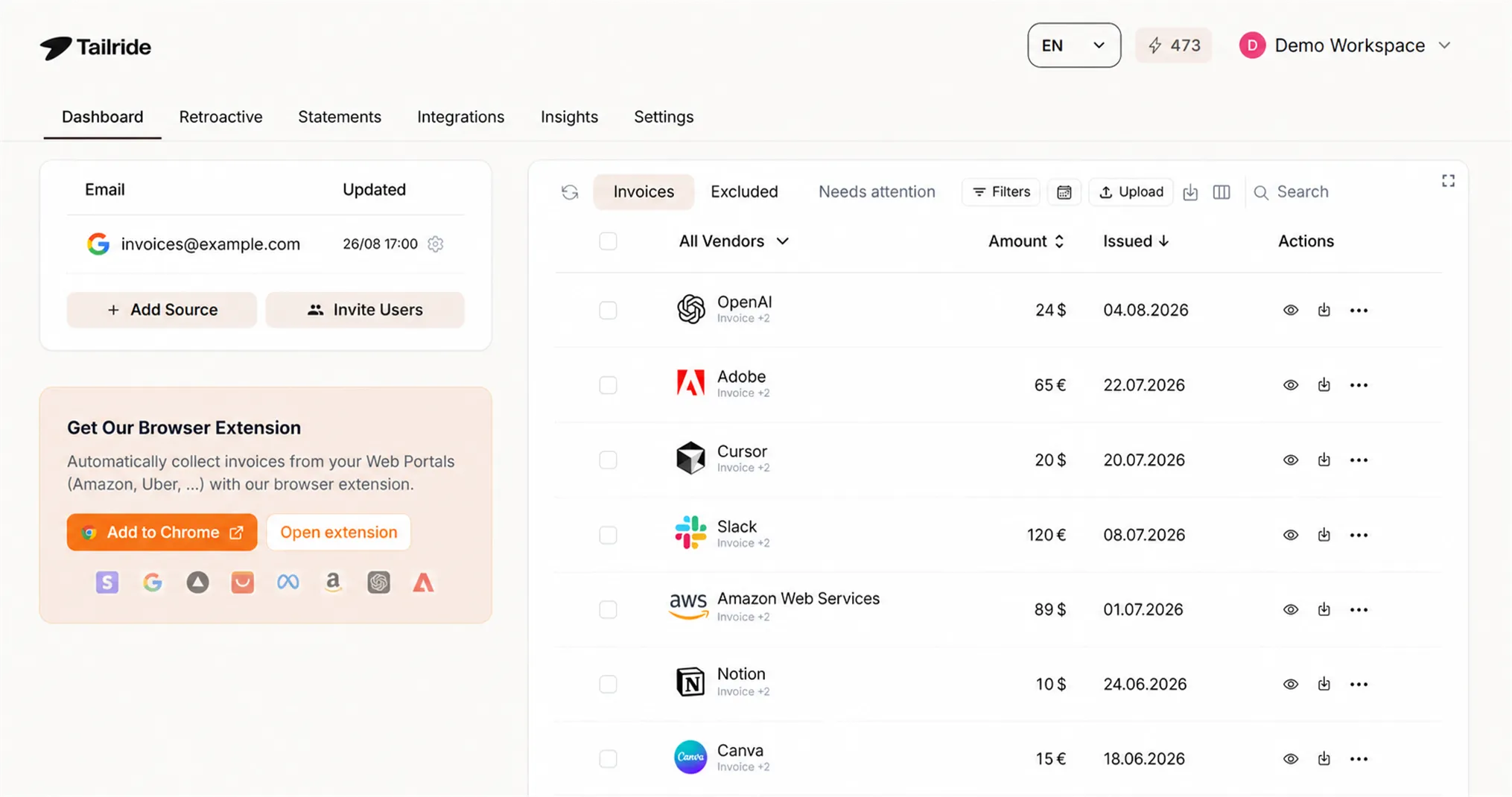
Tailride connects to sevdesk with an API token from Extensions → API (bookkeeping system 2.0 required) and works in front of everything above. Note the plan requirement from the table earlier: sevdesk lists the REST API under Accounting Pro, so check your tier before planning around any API integration, ours included.
It finds the documents. Inbox scanning reads Gmail, Outlook and IMAP and pulls the invoice out - including from the email body, and including by following the download link when the invoice sits behind one. Portal collection signs into suppliers like Amazon, Meta and Telekom that never send email. Retroactive scanning goes backwards through your history as far as you need, so the gap from before setup gets closed rather than written off.
It codes them properly. Every line rather than the header alone, to SKR03, SKR04 or your own chart of accounts. Where the tax rule on the document conflicts with the rate charged, the export stops and asks instead of quietly posting a zero. Reverse charge and foreign VAT are flagged, never silently zeroed, which is the failure mode that costs the most to unpick later.
It writes a finished voucher. Supplier contact, date, number, net and VAT, expense accounts, tax rule, PDF attached. Credit notes too. You choose whether vouchers land as drafts for review or booked outright, and whether export happens automatically on arrival.
To be clear about the boundary: if your suppliers all attach PDFs to emails and you are on Accounting, sevdesk's own email route handles that well and you do not need us for it. We earn our place on the three cases in the section above.
Ten invoices a month are free. Paid plans start at €12 a month billed annually. See the sevdesk integration →
FAQ
Can I capture invoices by email on any sevdesk plan?
No. AI-supported receipt capture is listed from the Accounting plan upwards, and the German pricing page puts capture by email (Belege per Mail erfassen) on the same two tiers. The Invoice plan sends invoices; it does not capture them. If intake is the reason you are buying sevdesk, Accounting is the entry point.
Which sevdesk plan do I need to use the API?
sevdesk lists the REST API as an Accounting Pro feature. Anything that connects over the API - including Tailride - is worth confirming against your tier before you commit, because the difference between Accounting and Accounting Pro is around €9 a month at list price.
Does sevdesk read line items or only the invoice header?
Automatic recognition covers document date, invoice number, amount, VAT and supplier, and proposes a category. That is header-level. Invoices with several positions or several VAT rates need splitting by hand, or a tool that extracts to the line - Tailride codes every line before the voucher reaches sevdesk.
What file formats does sevdesk accept?
PDF, JPG, PNG and XML. The XML route is how a saved ZUGFeRD or XRechnung file gets in when it did not arrive electronically.
Do I have to pay extra for E-Rechnung?
No, but check which half you mean. Creating and sending ZUGFeRD and XRechnung is on every paid plan. Capturing incoming e-invoices is listed from Accounting upwards. Neither carries a charge beyond the plan price, and files are validated and posted automatically.
Can I set up the DATEV Rechnungsdatenservice myself?
No. sevdesk states the DATEV interface services can only be ordered and set up by practices and their clients within the member-bound client relationship, and authentication runs on a DATEV SmartCard or SmartLogin. Your Steuerberater has to order it. The file export and the Steuerberaterportal both work without that step.
How long do documents have to be kept?
sevdesk states six to ten years from the end of the calendar year in which the document arose, with GoBD-compliant archiving that leaves posted documents unalterable. This is general information rather than tax advice - your adviser will tell you which period applies to which document in your case.
Can I fix a document after posting it?
Yes. Documents stay editable until booked or marked as paid, and reopening a booked document makes it editable again. The archived record itself is unalterable, which is the point of GoBD compliance.
Will Tailride duplicate invoices that sevdesk already captured?
No. Vouchers are matched before writing, and you can choose whether they arrive as drafts for review or booked outright, so you keep a checkpoint while the two routes overlap.
The takeaway
Getting invoices into sevdesk is a solved problem for documents you already have. Confirm you are on Accounting or above, turn on the email address, put your paper through the app, upload the strays, and push your largest suppliers towards ZUGFeRD so their invoices stop needing to be read at all. Then agree the DATEV route with your Steuerberater early, because the fastest of the three is the one they have to order for you.
What stays unsolved is collection. Every route sevdesk offers waits for a document to be handed to it, and a predictable share of your spend - link-only emails, portal-only suppliers, and everything from before you set this up - is never handed to anything. That is the part worth automating, and it is the part we do.
Related guides
Sources
This guide describes product behaviour verified in August 2026 and is general information, not tax advice. Plan contents and pricing change; confirm current details with sevdesk, and confirm bookkeeping and retention obligations with your Steuerberater.
