
How to Download AliExpress Invoices: Single, Bulk & VAT (2026)
Download AliExpress invoices for personal use, dropshipping, or business VAT - plus Tailride's hands-off bulk extraction across thousands of orders.

Last updated: April 2026 · ~7 min read
AliExpress isn't a single retailer - it's a marketplace hosting hundreds of thousands of independent sellers, and that distinction defines everything about how invoicing works. When you place an order, the invoice comes from the individual seller, not from AliExpress itself. This means invoice availability, format, and detail level vary significantly from one seller to the next.
This guide covers AliExpress - the consumer and dropshipping marketplace. It does not cover Alibaba (the B2B wholesale platform), 1688.com (China-only Alibaba sister site), Taobao (China-only consumer marketplace), Shein, or Temu. Each of these platforms operates a separate invoicing system, and the steps below don't apply to them.
TL;DR - 4 ways to get an AliExpress invoice
-
Single order download - Log in, go to My Orders, open the order, click "Download Invoice" to get a PDF directly from the seller.
-
Request from seller - If no invoice appears, message the seller with your business details. Most respond within 24–48 hours.
-
VAT-compliant invoice - Contact the seller before or after your order with your VAT number, business name, and billing address. Sellers participating in the EU IOSS scheme collect VAT at checkout.
-
Bulk download for volume - For 50+ orders per month, manual downloads stop being viable. The Tailride extension handles bulk AliExpress invoice extraction hands-off, with a dedicated multi-client console for accounting firms.
→ Try the free Chrome extension · See it for accounting firms
Quick navigation: which scenario fits you
| Scenario | Best for | Output format | Time per 100 invoices | Where it lives |
|---|---|---|---|---|
| Personal / one-off | Buyers needing a receipt for return or warranty | PDF from seller | ~2–3 hours | AliExpress My Orders |
| Business / VAT | Companies needing tax-deductible, VAT-compliant documentation | PDF with VAT fields | 3–5 hours (including seller communication) | Seller-issued via AliExpress message |
| Dropshipping (bulk) | Sellers running 50–500+ orders/month tracking COGS | Structured PDFs, ZIP bundle | ~20 min unattended | Tailride extraction console |
| Accounting firm | Bookkeepers handling multiple dropshipping/business clients | Structured data + PDFs synced to accounting software | Dashboard pull per client | Tailride for finance teams |
How AliExpress invoices actually work (the marketplace difference)
AliExpress operates as a marketplace - a platform connecting buyers with independent sellers based primarily in China, but also across other countries. AliExpress itself does not issue invoices for purchases. The platform handles payment processing, but the invoice for any given order is the responsibility of the individual seller who fulfilled it.
This single fact has four practical implications. First, invoice format varies by seller: some issue a formatted commercial invoice with full business details; others provide only a basic receipt or packing slip. Second, roughly 70% of AliExpress sellers generate invoices automatically - the remaining ~30% require a direct request from the buyer. Third, VAT information (your business name, VAT ID, billing address) is almost never pre-populated; it must be communicated to the seller explicitly. Fourth, invoice quality can range from a tax-compliant business document to a bare-bones order confirmation that won't satisfy your local tax authority.
This seller-controlled variability is the foundation for everything that follows. Each scenario below - single download, seller request, VAT compliance, bulk extraction - flows directly from this marketplace structure.
Scenario 1 - Download a single AliExpress invoice PDF
For a single order where the seller has already generated an invoice:
-
Log in to your AliExpress account.
-
Navigate to My Orders (account menu, top right → My Orders).
-
Locate the order and click to open the order details page.
-
Look for a "Download Invoice" link - typically positioned near the top of the order detail, above the item list.
-
Click it. An AliExpress invoice PDF will download to your browser's default download folder.
The button's exact label and position varies by seller setup. Some display it as "Invoice," others as "Download Receipt." If no button appears at all, proceed to Scenario 2.
Scenario 2 - Request an invoice when the seller hasn't issued one
The missing "Download Invoice" button doesn't mean an invoice isn't available - it typically means the seller hasn't generated one yet, or is waiting for your business details before doing so.
Steps to request:
-
Open the order detail page.
-
Click Contact Seller (in the order detail panel or via the seller's store page).
-
Send a message that includes:
-
Your full name or business name
-
Billing address
-
VAT number (if applicable - see Scenario 3)
-
The order number
-
Sample message template:
Hi, could you please issue a formal invoice for order #[ORDER ID]? Please include: Business name: [YOUR BUSINESS], Address: [YOUR ADDRESS], VAT/Tax ID: [YOUR VAT NUMBER]. Thank you.
Most sellers respond within 24–48 hours with either an updated PDF download in the order view or an invoice attached via message. If no response arrives after 48 hours, send a follow-up referencing the order number.
Scenario 3 - Get a VAT-compliant business invoice from AliExpress
EU and UK businesses buying on AliExpress for company expenses need an invoice that satisfies local tax authority requirements - specifically one that includes the seller's business details, your VAT number, itemized pricing, and a clear tax line.
Before placing the order (preferred): Contact the seller in advance. Provide your business name, VAT number, and billing address, and confirm they can issue a VAT-compliant commercial invoice. This avoids retroactive follow-up.
After placing the order: Use the seller message template from Scenario 2 with your VAT ID included. Sellers set up for business invoicing will update or re-issue the document; others may need additional prompting.
What a VAT-compliant AliExpress business invoice should include:
-
Seller's legal business name and address
-
Your business name and billing address
-
Your VAT/Tax ID number
-
Seller-generated invoice number
-
Order date
-
Itemized product list with unit price and quantity
-
VAT as a separate line item
-
Total amount in the invoice currency
If required fields are absent, the invoice may not be accepted for tax reclaim purposes.
Scenario 4 - Bulk download for dropshipping or business volume
AliExpress has no built-in bulk invoice export. Downloading invoices individually - open order, locate button, save PDF, repeat - takes 2–3 minutes per straightforward download and 5–10 minutes per order where seller contact is required. For a dropshipper running 200+ orders per month, that's 7–15 hours of manual document retrieval per month before any filing or review.
Third-party extraction tools fill this gap. Rather than navigating each order individually, these tools connect to your AliExpress account and extract invoices in batch across a selected date range, with consistent file naming and structured output.
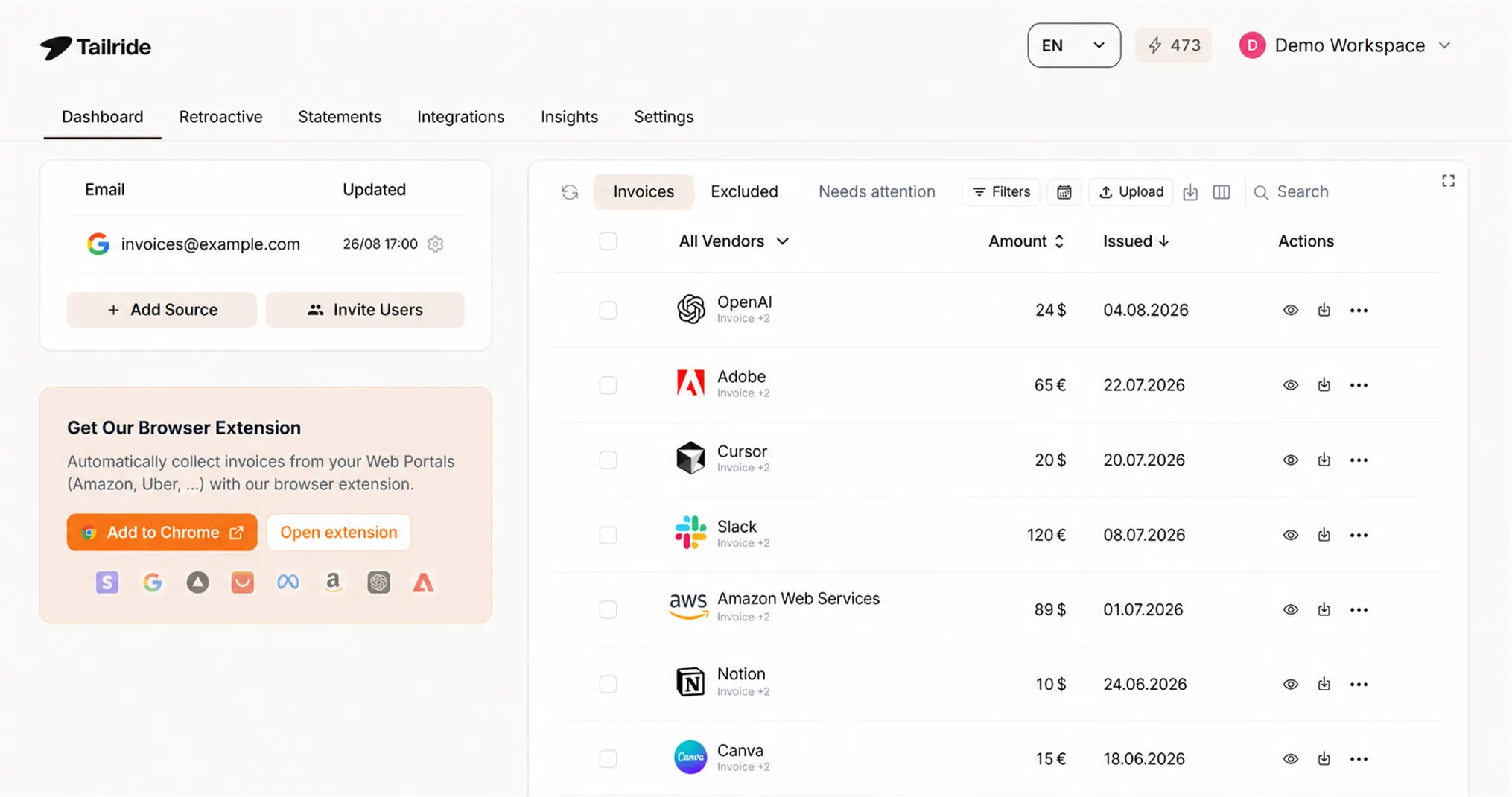
The Tailride extension handles AliExpress invoice download alongside automated extraction across 30+ vendor portals - meaning if your business sources from multiple suppliers beyond AliExpress, everything is retrieved in a single workflow. Extracted invoices are renamed with order ID and date, bundled as structured PDFs, and can sync directly to QuickBooks, Xero, or other connected accounting software.
The dropshipping in-package invoice question
A consistent concern for dropshippers: does AliExpress include an invoice in the package? If so, customers would see the AliExpress price - directly exposing your cost margin.
The short answer: most AliExpress sellers do not include pricing documentation inside shipments by default, particularly for international orders. However, practices vary by seller and should not be assumed.
For blind dropshipping - where the customer must not see your purchase price - add an explicit request to every seller message or storefront order note:
Please do not include any pricing or invoice documents inside the package. Blind shipping required.
Many sellers offer to include a generic packing slip without prices instead, which covers basic order tracking. Some also accommodate custom inserts for branded dropshipping operations.
If a seller does include a priced invoice contrary to a blind shipping request, raise it directly via order messages before the next shipment. Most sellers will confirm their standard practice upfront when asked.
EU IOSS and VAT compliance for cross-border purchases
Since the EU's Import One-Stop Shop (IOSS) scheme came into effect in July 2021, AliExpress purchases under €150 entering the EU are handled differently depending on the seller's registration status.
For IOSS-registered sellers: EU VAT is collected at checkout based on the destination country's VAT rate. The seller-issued invoice will include the IOSS-collected VAT, and the package should clear customs without additional VAT charges. The seller's IOSS number on the shipping documentation confirms this.
For non-IOSS sellers or orders over €150: VAT is collected at the customs entry point. In this case, the relevant tax document is the customs receipt issued by the national customs authority - not the seller invoice. For VAT reclaim purposes, a customs receipt and a seller invoice are not interchangeable; your local tax authority will specify which document type applies.
The aliexpress IOSS number question: If customs requests an IOSS number for an AliExpress order, it should appear on the seller's shipping documentation. If it's missing, contact the seller directly with the order number. AliExpress maintains a centralized IOSS registration, but individual seller compliance varies.
Reading your AliExpress invoice (key fields)
A properly issued AliExpress order invoice from a seller typically contains:
-
Seller name and business address - the store's legal entity information
-
Buyer details - your name or business name; VAT ID only if you provided it
-
Invoice number - seller-generated, unique per transaction
-
Order date - when the order was placed (not the shipping date)
-
Itemized product list - each item with unit price and quantity
-
Pricing and currency - usually USD or the seller's invoice currency
-
Tax/VAT line - present only if the seller is set up for VAT invoicing or is IOSS-compliant
-
Total amount - sum of goods, shipping, and applicable tax
-
Payment confirmation - reference to the AliExpress order ID or transaction
Missing fields are common due to per-seller variability in the marketplace. If required fields for your tax or accounting purposes are absent, the Scenario 2 workflow is the correct path to request a corrected or re-issued document.
Is manual download enough for your situation?
Personal buyer / one-off order:
The steps in Scenario 1 cover everything you need. If the invoice button is missing, Scenario 2's seller contact workflow resolves it within 24–48 hours. No additional tools required.
Business buyer (VAT, occasional orders):
The Scenario 3 workflow handles VAT-compliant documentation when combined with upfront seller communication. For fewer than 20 orders per month, manual retrieval is workable. Higher purchase frequency warrants a more structured approach.
Dropshipper running 50+ orders per month:
The volume at this level makes manual AliExpress invoice download unsustainable. The Tailride extension is built for bulk invoice capture at this scale - Start your free trial and configure AliExpress account extraction in under five minutes.
Accounting firm managing multiple dropshipping clients:
Per-account manual workflows compound across clients - separate logins, inconsistent seller response times, no unified view. Tailride's accounting console provides a multi-client dashboard with unified extraction and accounting software sync. Tailride for accounting firms - the multi-client AP automation console built for finance teams.
At scale: what manual AliExpress invoice work actually costs
For a dropshipper running 200–500 orders per month, the numbers are concrete: each invoice that requires a seller request takes 5–10 minutes between composing the message, waiting for a response, and downloading the file. Straightforward downloads average 2–3 minutes per order when navigating between order pages at volume. At 300 orders per month with ~30% requiring seller contact, manual invoice collection runs 8–12 hours per month - before any filing, sorting, or accountant hand-off.
For accounting firms with 5+ dropshipping clients, this multiplies across accounts with no cross-client visibility and no consolidated output. Third-party extraction tools for AliExpress range from browser extensions to full invoice aggregation platforms; for a feature-level breakdown with one of the established alternatives, see compare Tailride to GetMyInvoices.
Manual download vs Tailride extraction
| Manual per-order download | Tailride extraction | |
|---|---|---|
| Time per 100 orders | 8–12 hours (variable per seller, some require requests) | ~20 minutes of unattended runtime |
| Per-seller variation handling | Manual workflow per seller - different approach for some | Unified extraction across all sellers |
| VAT/business invoice requests | Individual seller messages, 24–48h response wait per seller | Captured when seller has provided invoice format with required fields |
| Multi-account / multi-client | Switch accounts, separate workflow per account | All client accounts in one console |
| Backlog from prior periods | Download per order - very slow at scale | Single full-history scan via retroactive invoice scanning |
| Output ready for accounting | Raw PDFs requiring manual rename and sort | Structured data + PDFs synced to QuickBooks, Xero, or your ERP |
Three extraction routes
1. Browser-session extraction - The Tailride extension runs within your active AliExpress browser session, pulling invoices directly from your My Orders page without storing credentials externally. Best for dropshippers managing their own account.
2. Inbox-side extraction - Some AliExpress seller invoices arrive via email. AI inbox scanning captures these from your connected inbox alongside invoices from other vendors delivered by email.
3. Multi-client console - For accounting firms, each client account is configured once in the platform purpose-built for multi-client invoice workflows. Extraction runs on schedule and delivers structured data per client.
Common AliExpress invoice problems
The "Download Invoice" link is missing
The invoice button is absent because the seller hasn't generated the invoice yet. Use the Scenario 2 seller contact workflow. This is the most frequent issue and is typically resolved within 24–48 hours.
Seller hasn't responded to invoice request
Allow the full 48-hour window before following up. Send a second message referencing the order number directly. If the order is still open and the seller remains unresponsive, the AliExpress buyer protection system can be used to flag documentation issues.
Invoice doesn't include my business name or VAT info
This occurs when the seller generated the invoice before receiving your details. Request a corrected version via the seller message thread, providing your full business name, VAT number, and billing address. Most sellers can re-issue a corrected document.
A priced receipt was included in the package despite blind shipping
Confirm blind shipping explicitly with the seller before each subsequent order. Add it to your standard order note or seller communication template to prevent recurrence.
Order shows "completed" but no invoice was generated
Completed status doesn't prevent invoice issuance. Contact the seller with your order number and request the invoice directly - this is a common gap in sellers who issue invoices only on request.
I need invoices for multiple orders combined into one
AliExpress issues invoices on a per-order basis with no native combine feature. Extraction tools bundle all selected invoices into a single, date-organized ZIP file - the practical equivalent for monthly or quarterly accounting submissions.
FAQ
Can I download AliExpress invoices in bulk?
AliExpress has no built-in bulk export. Third-party extraction tools handle bulk AliExpress invoice download across a selected date range. For 100 orders, that's roughly 20 minutes of unattended processing versus 8–12 hours manually.
Are AliExpress invoices valid for tax purposes?
Generally yes, provided the invoice contains required fields: seller name, your business details, VAT number (if applicable), itemized pricing, and a total. Requirements vary by country - confirm with your accountant that the document format meets your local tax authority's standards.
What is the AliExpress IOSS number?
Since July 2021, EU orders under €150 from IOSS-registered sellers include EU VAT collected at checkout. The IOSS number on shipping documentation confirms VAT was collected at source. If customs requests it and it's missing from the shipping label, contact the seller directly with the order number.
How do I get an AliExpress commercial invoice for customs?
Request one from the seller before shipment using the Scenario 2 template. A customs commercial invoice should include: seller's business details, buyer details, itemized product descriptions, declared value, country of origin, and harmonized tariff codes where required.
Can I retrieve invoices for old AliExpress orders from prior years?
Yes - most sellers can re-issue invoices for historical orders. For large historical backlogs, scan your full order history in a single run rather than downloading order by order.
What's the difference between an AliExpress receipt and an invoice?
An AliExpress order receipt confirms that payment was processed through the platform. A seller-issued invoice is the formal business document that includes seller identity, itemized product details, and tax information. For accounting and tax purposes, the seller invoice is the authoritative document.
Is AliExpress the same as Alibaba for invoicing?
No. AliExpress is a consumer and dropshipping marketplace; Alibaba is a B2B wholesale platform with entirely separate invoicing procedures. See How to Get Alibaba Invoices and Receipts for the B2B workflow.
Related guides
-
Invoice data extraction software - how extraction tools process invoice PDFs into structured accounting data
-
Automated invoice capture software - overview of capture tools for accounting workflows
-
Invoice management best practices - organizing financial documents for clean, audit-ready records
-
AP automation for accounting firms - multi-client invoice processing for bookkeepers and finance teams
-
Alibaba invoicing guide - invoicing on the B2B wholesale platform