
How to Forward Invoices to Your Accountant Automatically (2026)
Stop emailing your accountant receipts at quarter-end. Here's how to forward invoices to your accountant automatically - and why capturing them first matters.

End the quarter-end scramble - get every invoice to your accountant without lifting a finger.
The short version: there are four ways to get invoices to your accountant - forward them by hand, email them into your accounting software's inbox (QuickBooks and Xero both have one), set up a rule that auto-forwards anything labelled "invoice," or use a tool that captures every invoice first and then forwards or syncs it for you. Only the last one is truly hands-off, because forwarding is useless if you never collected the invoice in the first place.
Tailride captures invoices from your email, messengers, and vendor portals, then auto-forwards them to your accountant's inbox or syncs them straight into QuickBooks, Xero, or Odoo.
Every accountant has sent the same email: "Can you send me the receipt for that one?" And every business owner has felt the small dread of quarter-end - the scramble through inboxes and pockets to assemble a zip file of invoices nobody filed as they came in. It's nobody's favourite ritual, and in 2026 it's entirely avoidable. This is how to make invoices reach your accountant on their own.
Why the manual way keeps breaking
The default setup is you, forwarding emails. A receipt arrives, you remember to forward it to your accountant - or, more often, you don't, and it joins a pile you'll deal with "later." Some people upgrade to a shared Google Drive folder, or a monthly zip. It's better, but the work is still yours, and the failure point is still memory: the invoice you forget is exactly the one your accountant chases you for.
The chase emails are the symptom. The disease is that collecting invoices is a manual job sitting between you and your books, and any manual job done forty times a month eventually gets skipped.
How often should you send invoices to your accountant?
It used to be "as often as you can stand to." Daily is ideal and almost nobody manages it; weekly is sensible and slips; monthly is common and means a monthly catch-up; quarterly is where receipts go missing and deductions get lost. The whole frequency debate exists only because sending is manual - a chore you batch up so you can do it less often.
Automate the sending and the question dissolves. When every invoice is captured and delivered the moment it arrives, your accountant works from live data instead of a monthly drop, there's no batch to assemble, and "how often" quietly becomes "continuously" - with no extra effort from you.
The four ways to get invoices to your accountant
| Method | Effort | Catches everything? |
|---|---|---|
| Forward emails by hand | High, ongoing | Only what you remember |
| Email into your accounting software | Medium | Only what you forward |
| Auto-forward rule (Gmail/Outlook) | Setup, then low | Only keyword matches |
| Capture-and-forward tool | One-time setup | Yes - every source |
Forward by hand. Free and simple, fine when you have a handful of suppliers. It doesn't scale, and it depends entirely on you remembering.
Email into your accounting software. QuickBooks gives you a custom address ending in @assist.intuit.com; Xero gives each organisation a dedicated bills email. Forward an invoice there and it's captured as a draft bill. Useful - but you're still the one forwarding each one, and it only handles email, not the invoice sitting in an Amazon or Meta Ads portal.
Set up an auto-forward rule. In Gmail or Outlook you can rule-forward anything with "invoice" or "receipt" in the subject to your accountant's address. Set-and-forget, until you notice it misses everything labelled "Your order" or "Payment confirmation," and forwards the odd newsletter that isn't an invoice at all.
Use a capture-and-forward tool. Instead of forwarding documents one at a time, a tool watches all your sources, recognises an invoice by its content, and forwards or syncs it automatically. This is the only option that's both hands-off and complete - because it doesn't rely on you, or on a keyword.
The catch nobody mentions: forwarding only works if you captured it
Every method above shares one blind spot. You can only forward an invoice you actually have - and a lot of them you don't. They're buried in a colleague's inbox, sitting in the body of an email with no attachment, or locked behind a vendor portal (Amazon Business, Meta Ads, Adobe) that never emailed you anything. A forwarding rule can't forward an invoice that never reached your inbox.
So "forward invoices to your accountant automatically" is really two jobs: collect every invoice, then deliver it. Solve only the second and you've automated sending the half of your invoices you happened to have. The complete version automates both.
The complete setup: capture everything, then route it
This is the job a dedicated tool is built for. Tailride handles both halves in one connection:
-
It collects every invoice. It connects to your inbox (Gmail, Outlook, IMAP), reads invoices from attachments and from the email body, pulls the ones behind vendor portals with a browser extension, and even takes receipts you photograph and send to its WhatsApp or Telegram bot.
-
Then it delivers them to your accountant, two ways you can use together:
-
Auto-forward to their inbox. Tailride's Email Routing automatically forwards every captured invoice to any email address - your accountant's, your firm's
accounts@, wherever it needs to go. -
Sync straight into the books. It pushes coded data into QuickBooks, Xero, or Odoo as fully detailed bills, with the original document attached - so your accountant works in the system they already use, with nothing to re-key.
-
The result is the version of quarter-end where there's no scramble and no zip file, because everything has been arriving in your accountant's hands all along.
Stop being the bottleneck between your receipts and your accountant. Connect Tailride free - your first 10 invoices a month are on us.
What you get back
Automating the hand-off changes more than your inbox:
-
Hours, every month. The time you spent forwarding, searching, and assembling a quarter-end zip simply disappears.
-
Every deduction. The receipts that used to go missing - the ones that quietly cost you at tax time - get captured the moment they arrive.
-
An audit trail by default. Each record reaches your accountant with its original document attached, so there's nothing to reconstruct later.
-
A calmer close. Your accountant works from live data all year, so filing season is a review rather than an excavation.
-
A better relationship with your accountant. No nagging in either direction - worth more than it sounds.
Even better than forwarding: give your accountant standing access
Forwarding is delivery. Access is something more useful. Instead of pushing documents at your accountant, you can give them a seat in your workspace, where every captured invoice appears with vendor, date, amount, tax, and the source document - ready to review, approve, or query without a single email back to you.
For accounting firms, this is the whole model: connect each client's email, messengers, and portals to a shared workspace, and invoices flow in from every channel into one place, then on to each client's QuickBooks, Xero, or Odoo. (If you are the accountant rather than the client, that's what Tailride for accountants is built for - multi-client capture from a single dashboard.)
Either way, the chase email goes extinct: if a vendor sent an invoice, your accountant can already see it.
What your accountant actually wants from you
Ask any bookkeeper and the wish list is short and consistent:
-
The source document, attached - not just a number, but the actual invoice or receipt behind it.
-
Clean, categorised data - vendor, date, amount, and tax already right, so they review instead of re-type.
-
No duplicates - the same bill sent twice doubles their work and your payables.
-
On time - a steady trickle they can reconcile, not a quarter's worth in one go.
-
In their system - ideally already in QuickBooks, Xero, or Odoo, where they actually work.
A good automation gives them all five by default. Forwarding a folder of PDFs gives them maybe two.
How to set it up, step by step
-
Connect your sources. Link your inbox, and add your vendor portals and WhatsApp/Telegram if you use them. This is the "capture everything" half.
-
Choose how your accountant receives it. Turn on auto-forwarding to their email address, connect your accounting software so data syncs into it, or invite your accountant into your workspace - or all three.
-
Set your rules (optional). Tell Tailride how to categorise and tag in plain language ("all Uber receipts → Transport"), so what your accountant receives is already coded.
-
Walk away. New invoices are captured, coded, and delivered automatically. Past invoices can be swept from your inbox history in one pass, so you start caught up.
What it looks like in practice
Picture a freelancer who finishes a client lunch, photographs the receipt, and sends it to a chat bot - it's categorised and on its way to their accountant before the coffee arrives. The same week, an AWS bill lands by email and an Amazon Business invoice sits behind a login; both are captured without a thought. Nothing is forwarded by hand, nothing is dropped in a folder, and nothing is forgotten. When the quarter ends there's no scramble: the accountant already has every document, coded and complete, and the review takes ten minutes instead of two days.
How Tailride does it
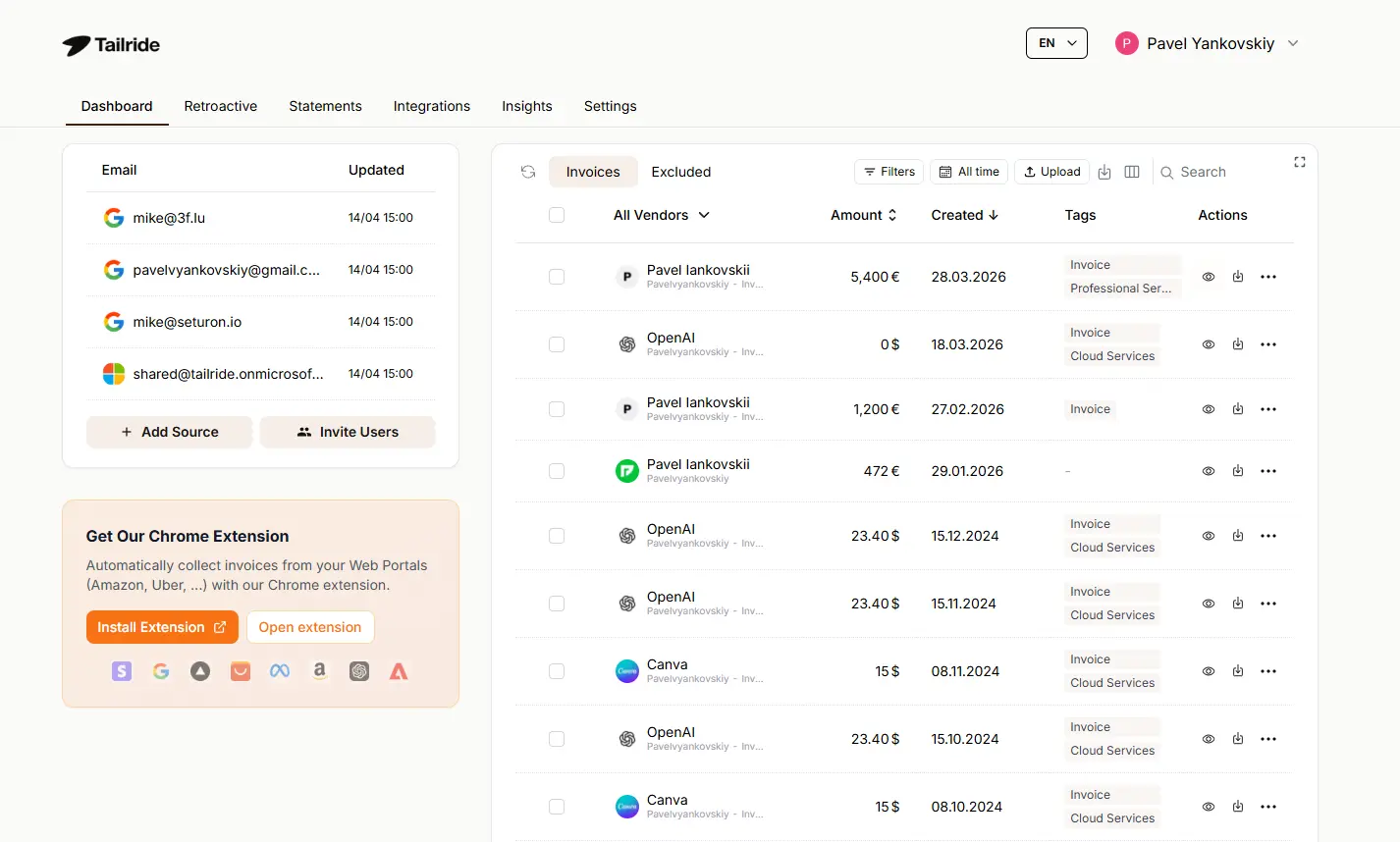
Tailride is built to be the single connection between your invoices and your accountant. It captures from email, messengers, and vendor portals, reads each document with the same class of AI behind tools like ChatGPT, de-duplicates so nothing is sent twice, and then routes the result - to your accountant's inbox, into QuickBooks, Xero, or Odoo, or into a shared workspace. It's CASA Tier 2 assessed, GDPR compliant, and stores data in the EU.
The point isn't to add another step to your month-end. It's to remove the step where you were the step.
Ready to never chase a receipt again? Start free or see how it works for accountants.
FAQ
How do I forward invoices to my accountant automatically?
Use a tool that captures invoices from your email, portals, and messengers, then auto-forwards them to your accountant's address or syncs them into your accounting software. A plain Gmail or Outlook forwarding rule can also forward email invoices, but it only catches keyword matches and misses anything not in your inbox.
How do I email receipts straight into QuickBooks or Xero?
QuickBooks gives you a custom email address ending in @assist.intuit.com, and Xero gives each organisation a dedicated bills email. Forward an invoice to that address and it's captured as a draft bill. To do this automatically for every invoice - including ones behind portals - connect a capture tool like Tailride that forwards or syncs them for you.
Can my accountant just have access instead of me forwarding things?
Yes, and it's usually better. With a shared workspace, every captured invoice appears in your accountant's dashboard to review and approve, so there's nothing to forward and no chase emails. Tailride supports this directly, and it's the core of its accountant workspace.
How do I stop my accountant chasing me for receipts?
Capture every invoice automatically as it arrives, from every source - not just the ones you remember to forward. When collection is automated, the invoices that used to go missing simply don't, so there's nothing left to chase.
Does this work if invoices arrive in different places?
Yes - that's the point. Invoices come by email, in email bodies with no attachment, through messengers, and behind vendor portals. A complete tool captures all of these and delivers them to your accountant from one place, rather than leaving you to forward each source by hand.
How often should I send invoices to my accountant?
Ideally as they arrive, not in a monthly or quarterly batch - the longer you wait, the more goes missing. With automated capture and forwarding, delivery is continuous, so frequency stops being something you have to manage.
What format does my accountant want - PDF, photo, or spreadsheet?
Most accountants want the original invoice (a PDF or a clear photo) plus the key data, ideally already in their accounting software. A capture tool delivers both: the source document attached and the extracted fields coded into QuickBooks, Xero, or Odoo.
Is it secure to route my financial documents this way?
With a reputable tool, yes. Look for OAuth sign-in rather than stored passwords, encryption, and clear data residency. Tailride is CASA Tier 2 assessed, GDPR compliant, and stores data in the EU.