
How to Capture Invoices via WhatsApp and Telegram
Capture invoices through WhatsApp and Telegram with AI extraction. From photo to accounting in seconds.

Paper receipts have a talent for disappearing. They fade in wallets, get buried in jacket pockets, and blend into the 12,000 photos on your phone. By the time your accountant asks for them, they're gone - and so is your tax deduction.
What if you could snap a photo, send it in a chat, and never think about that receipt again?
That's exactly what Tailride's WhatsApp and Telegram integrations do. No new app to install, no workflow to learn. Just open the messenger you already use, send the receipt, and Tailride's AI handles the rest - extraction, categorization, and delivery straight to your accounting software.
Why Capture Receipts Through a Messenger?
Every business has two types of invoices: digital ones that arrive by email, and physical ones you get handed at a restaurant, a taxi, or a supplier's office. Most automation tools handle the first type well. The second type? That's where things fall apart.
The core problem is friction. You receive a paper receipt, and between that moment and the moment it reaches your accounting system, there are too many steps. Open a dedicated receipt scanning app, take a photo, wait for it to process, tag it, categorize it, export it. Most people give up somewhere around step two. The receipt stays in their pocket, gets crumpled, fades, and eventually joins a pile of undocumented expenses that haunt you at tax time.
Traditional receipt apps add a different kind of friction: you need to download yet another app, create an account, learn the interface, and remember to actually open it every time you get a receipt. That's a lot of behavior change to ask for - and most people don't stick with it.
Messengers eliminate all of that because they're already open. WhatsApp has over 2 billion active users worldwide. Telegram is the default messaging platform in dozens of countries across Eastern Europe, Central Asia, and beyond. You don't need to download anything new, create yet another account, or learn a new interface. You just send a message - the same way you'd send a photo to a friend. The gap between "I have a receipt" and "it's in my accounting system" shrinks from minutes of manual work to a single gesture.
What Tailride Extracts from Your Receipts
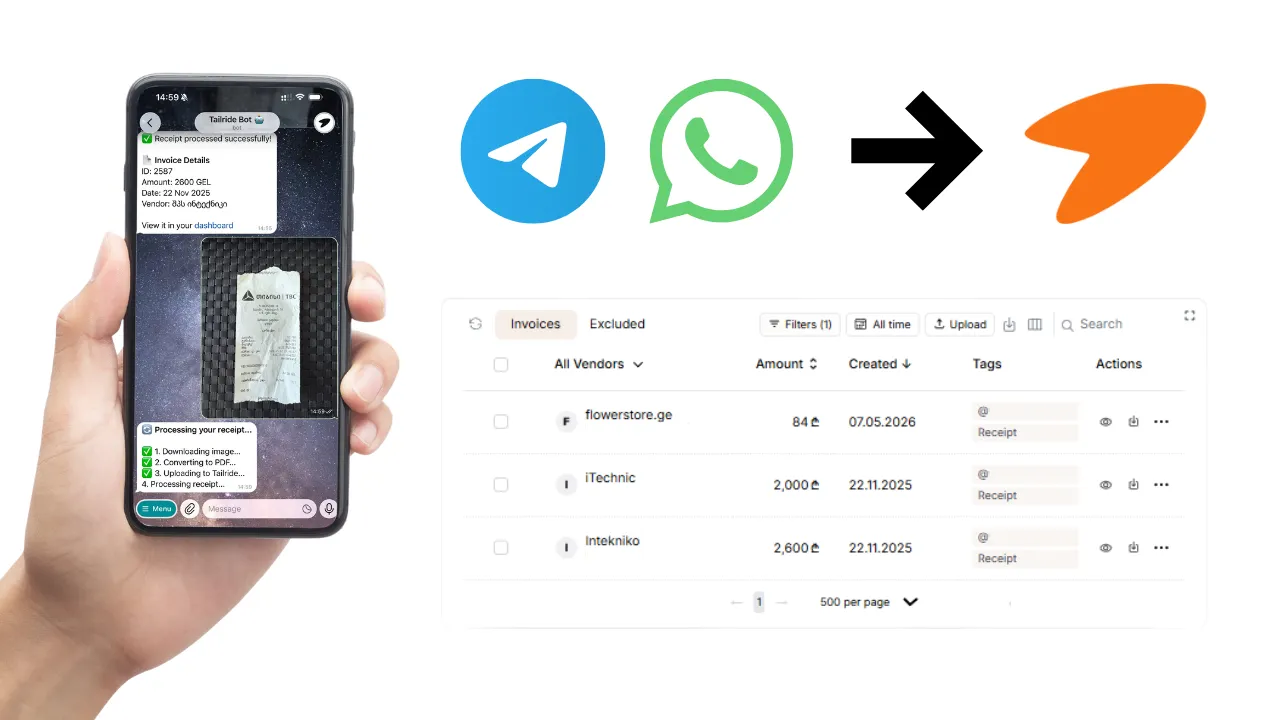
When you send a receipt photo or PDF to Tailride's WhatsApp or Telegram bot, the AI engine gets to work immediately. Within seconds, it extracts:
-
Vendor name - who issued the receipt
-
Date - when the transaction happened
-
Total amount and currency - including multi-currency support
-
Tax breakdown - VAT, sales tax, or other applicable taxes
-
Line items - individual products or services, when visible
The extracted data appears on your Tailride dashboard, where you can review, edit, or approve it before it flows to your accounting software. Tailride also includes duplicate protection - if you accidentally send the same receipt twice, it won't be processed (or charged) a second time.
Supported Formats - JPG and PDF
For the best extraction accuracy, snap your photos with good lighting, keep the receipt flat, and make sure the entire document is visible in the frame.
Setting Up WhatsApp and Telegram in Tailride
Setup takes less than two minutes for each channel. No API keys, no developer console, no IT department required.
WhatsApp Setup
-
Go to Integrations in your Tailride dashboard and click + Add Account on the WhatsApp card.
-
Enter your WhatsApp phone number (including country code). You can add multiple numbers - useful if different team members will be sending receipts from their own phones.
-
Start a chat with the Tailride bot at +34 641 59 43 75 (or use the direct wa.me link in your dashboard). Send your first receipt photo or PDF.
That's it. The bot also supports quick commands: send "help" for instructions or "status" to check your connection and remaining credits.
Telegram Setup
-
In the Integrations tab, click + Add Account on the Telegram card.
-
Enter your Telegram username. Like WhatsApp, you can link multiple usernames for team-wide capture.
-
Open a chat with the Tailride bot and send a receipt photo.
Telegram commands work the same way: /start for a welcome message, /help for instructions, /status to check your credit balance.
Multi-User Access
This is where Tailride really shines for teams. Link as many phone numbers (WhatsApp) or usernames (Telegram) as you need. Every team member sends receipts from their own device, and everything lands in a single company dashboard. Your sales team capturing travel expenses across three countries? Your field technicians collecting supplier receipts? Everyone contributes, nobody needs training.
Where Messenger Capture Fits in the Bigger Picture
Here's what sets Tailride apart from tools that only offer messenger-based capture: WhatsApp and Telegram are just two channels in a much larger automation ecosystem.
Most businesses don't just have paper receipts. They have digital invoices arriving by email, subscription invoices buried in vendor portals, and recurring charges that never generate a proper document at all. Tailride handles all of these:
Inbox Scanning connects natively to Gmail, Outlook, and any IMAP email. It monitors your inbox (and your colleagues' inboxes) in real time, automatically extracting every invoice from emails - whether the invoice is a PDF attachment, an image, embedded in the email body, or hidden behind a download link.
Retroactive Scanning lets you go back in time. Just connected Tailride? You can scan your inbox for all invoices from this month, this quarter, this year, or any custom date range. No more frantic end-of-quarter scrambles.
Browser Extension (Chrome, Edge) pulls invoices from online portals like Amazon, Meta Ads, Adobe, Notion, Microsoft 365, ChatGPT, and 20+ other platforms. These companies increasingly don't email invoices anymore - you have to log into their portal, navigate to billing, and download manually. One click on the Tailride extension and they're all on your dashboard.
AI Rules let you set custom logic so that extraction isn't just automated - it's intelligent. Examples: "Classify all Uber receipts as Transport," "Set tax rate to 0%, 8%, or 20%," "Tag invoices issued to Harry as Personal," or "For Cloudflare invoices, set due date to Net 30." You define the rules in plain language, and the AI follows them.
Reconciliation matches your invoices against bank statements. Upload a bank statement in PDF or CSV, and Tailride's AI cross-references your transactions to find missing invoices - with automatic currency conversion when your expenses and bank are in different currencies.
The result: messenger capture covers your paper receipts, inbox scanning covers your digital invoices, the Chrome extension covers vendor portals, and reconciliation catches anything that slipped through. Together, that's 100% coverage.
Integrations: From Capture to Accounting, Automatically
Capturing invoices is only valuable if the data reaches your accounting system. Tailride integrates with the tools businesses actually use:
Accounting software: QuickBooks, Xero, Odoo Accounting, and Microsoft Business Central. Invoices are pushed as fully detailed bills or expenses - vendor, amount, date, tax, line items, and any custom fields you've configured through AI Rules.
Cloud storage: Google Drive and OneDrive for organized invoice archiving. Tailride can automatically sort files into folders by month, vendor, or any structure you define.
Spreadsheets: Google Sheets for teams that need invoice data in tabular format - great for custom reporting, budget tracking, or sharing with external accountants.
Export formats: DATEV XML export for German accounting workflows.
Every integration runs automatically. Once configured, invoices flow from capture to destination without you lifting a finger.
Tips for Getting the Best Extraction Results
AI extraction is only as good as the input it receives. A few simple habits will dramatically improve your accuracy and save you time on manual corrections.
Lighting matters. Natural light or a well-lit room makes a big difference. Avoid harsh shadows across the receipt - they can obscure text and confuse the AI. If you're in a dimly lit restaurant, use your phone's flash, but hold the camera far enough away to avoid glare on glossy thermal paper.
Keep it flat and straight. Crumpled or angled receipts lose readability fast. Lay the receipt flat on a table and shoot directly from above. You don't need to be perfectly aligned, but the closer to straight-on you get, the better the extraction will be.
Capture the full document. Make sure all four edges of the receipt are visible in the frame. The AI needs to see the vendor name at the top and the total at the bottom. Cropping off the header or footer means missing data.
One receipt per message. Send each receipt as a separate photo or PDF for the cleanest results. Batch processing is supported, but individual sends give the AI the best chance at accurate field-by-field extraction.
Use PDF when available. If your vendor emails a digital receipt alongside the paper one, forward the PDF through WhatsApp. Digital documents always produce better extraction than photos of printed text.
WhatsApp vs Telegram for Receipt Capture: Which Should You Use?
Both channels work well, but they have different strengths depending on your situation.
Choose WhatsApp if your team is already on WhatsApp (common in Europe, Latin America, and much of Asia and Africa). It's the better choice for teams where some members aren't particularly tech-savvy, since everyone already knows how to send a WhatsApp message.
Choose Telegram if your team prefers Telegram (popular in Eastern Europe, Central Asia, and among tech-oriented users), or if you want a lightweight bot experience with slash commands. Telegram's bot interface feels native and fast, and the /status command makes it easy to check credits without leaving the chat.
Use both if your team is split across platforms, or if you operate in regions where one messenger dominates over the other. Tailride treats both channels equally - receipts from either one land in the same dashboard with the same AI processing. There's no cost difference and no feature penalty for using both.
Real-World Use Cases
Freelancers and solopreneurs: You finish a client lunch, snap the receipt under the table, send it to Telegram, and it's categorized and in your QuickBooks before you've finished your coffee. No more shoe boxes of receipts at tax time. At the end of the quarter, your accountant gets a clean export with every expense accounted for - no chasing, no guessing, no manual entry.
Distributed teams: A sales team spread across five countries. Each person sends travel receipts - flights, hotels, meals, taxis - from their WhatsApp. Finance sees everything in one dashboard, tagged by employee and project. AI Rules handle the categorization automatically: airline receipts go to Travel, restaurant receipts go to Entertainment, hotel receipts go to Accommodation. Month-end expense reports go from a two-day nightmare to a 10-minute review.
Accountants managing multiple clients: Connect each client's team members to a shared workspace. Receipts and invoices flow in from every channel - email, messenger, portals - and you have a unified view across all your clients. No more chasing people for missing documents. With Tailride's integrations, extracted data flows directly into each client's QuickBooks, Xero, or Odoo Accounting instance - reducing your manual data entry to near zero.
Privacy, Security, and Compliance
Tailride has completed a Cloud Application Security Assessment Tier 2 (CASA), validated by the App Defense Alliance. Your data is stored within the European Union (AWS Frankfurt, eu-central-1), and Tailride is fully GDPR compliant with a Data Processing Agreement available on request.
When you send a receipt through WhatsApp or Telegram, Tailride processes the image, extracts the data, and stores it securely. Your messenger conversations are not stored or monitored - only the receipt images you explicitly send to the bot are processed.
Credits are only consumed on successful processing. If extraction fails for any reason, you're not charged.
For businesses that need to comply with local data residency requirements, Tailride's EU-based infrastructure means your financial documents never leave Europe. The platform also adheres to the Google API Services User Data Policy, including Limited Use requirements - so your Gmail data stays protected under Google's strictest standards.
Getting Started with Tailride
Tailride offers a free plan that lets you process up to 10 invoices per month - no credit card required. That's enough to test every feature: messenger capture, inbox scanning, AI rules, and accounting integrations.
Setup takes under two minutes:
-
Sign up at tailride.so - Google SSO available.
-
Connect your channels - add your WhatsApp number, Telegram username, and email inboxes.
-
Send your first receipt - snap a photo, send it to the bot, and watch it appear on your dashboard within seconds.
If you're an accountant managing 10+ clients, check out Tailride for Accountants for multi-client workspace features and volume pricing.
Frequently Asked Questions
Does Tailride support multiple users sending receipts from different phones?
Yes. Tailride lets you link multiple WhatsApp phone numbers and Telegram usernames to a single account. Each team member sends receipts from their own device, and all documents appear in one shared company dashboard. There is no limit on the number of users you can connect.
What file formats can I send through WhatsApp and Telegram?
Both WhatsApp and Telegram support receipt photos (JPG) and PDF documents. For the best results, photograph receipts with good lighting on a flat surface with the full document visible.
Which accounting software does Tailride integrate with?
Tailride integrates with QuickBooks, Xero, Odoo Accounting, and Microsoft Business Central. Invoices are pushed automatically as fully detailed bills or expenses, including vendor name, amount, date, tax breakdown, and line items. Tailride also exports to Google Drive, OneDrive, Google Sheets, and DATEV XML format.
How accurate is Tailride's AI extraction?
Tailride's AI engine extracts vendor name, date, total amount, currency, tax breakdown, and line items from receipts and invoices. You can further improve accuracy with AI Rules - custom instructions in plain language that tell Tailride how to categorize and process specific vendors, amounts, or document types.
Is my data secure when I send receipts through WhatsApp or Telegram?
Tailride has completed a Cloud Application Security Assessment Tier 2 (CASA), validated by the App Defense Alliance. All data is stored within the EU (AWS Frankfurt). Tailride is fully GDPR compliant. Only the receipt images you send to the bot are processed - your messenger conversations are not stored or monitored.
How much does Tailride cost?
Tailride offers a free plan with up to 10 invoices per month, no credit card required. Paid plans start at $19/month for 50 invoices. You can also purchase individual credits that don't expire. For accountants managing multiple clients, Tailride offers dedicated multi-client pricing at tailride.so/accountants.
Does Tailride only capture receipts from messengers?
No - messenger capture is one channel in Tailride's automation ecosystem. Tailride also monitors email inboxes (Gmail, Outlook, IMAP) for digital invoices, extracts invoices from vendor portals like Amazon and Meta Ads via a broswer extension (Chrome, Edge), supports retroactive scanning of past emails, and offers bank statement reconciliation to catch missing invoices. Together, these channels provide complete invoice coverage.
Tailride is AI-powered invoice and receipt automation software that captures documents from email, messengers, and vendor portals, then delivers them to your accounting system - automatically. Trusted by companies like Playtomic, Beretta, and Ucademy. Start free at tailride.so.